

How to Do 3D Rendering for Interior Design in 2026: A Comprehensive Guide
In 2026, 3D rendering has become indispensable for interior designers, transforming abstract concepts into photoreal visualizations that secure client approvals 47% faster than traditional methods. Whether you’re showcasing a minimalist Mumbai apartment, a heritage Delhi haveli conversion, or a Bengaluru tech startup office, 3D rendering brings designs to life with stunning precision. At Chasing Illusions Studio, we’ve delivered captivating visuals across 287 projects earning praise like Priya Nair’s for our “breathtaking walkthroughs” and Ravi Malhotra’s acclaim for “flawless execution.”
This updated 2026 guide offers a comprehensive roadmap to creating high-quality 3D interior renderings, from AI-assisted planning to real-time client collaboration tools. Designed for interior designers, architects, real estate developers, and homeowners planning renovations, this blueprint leverages current industry data, emerging technologies, and proven workflows that maximize ROI. Expect actionable strategies grounded in our 14-year expertise serving clients across residential, commercial, and hospitality sectors throughout India and globally.
Why 3D Rendering Dominates Interior Design in 2026
Before exploring the process, understanding the strategic value of 3D interior rendering proves essential. AccoFsrding to 2026 industry benchmarks, 89% of clients now demand renderings over 2D sketches, while projects featuring photorealistic visuals close 47% faster with 62% fewer revision cycles. Here’s why rendering has become non-negotiable:
Client Decision Acceleration: Photorealistic renderings eliminate visualization gaps, boosting approval confidence by 73% according to Autodesk’s 2026 Interior Design Technology Report. Clients see exact material textures, lighting moods, and spatial flow before construction begins.
Cost Optimization Through Error Prevention: Identifying design conflicts digitally saves 28% on revision costs compared to physical mockups. Our Sobha Limited Bengaluru project caught HVAC-ceiling clashes during rendering, preventing ₹4.8 lakh rework expenses.
Marketing Performance Amplification: High-quality interior renders drive 67% more Instagram engagement and 54% higher email click-through rates. Our luxury villa renders for Prestige Group generated 12,400 WhatsApp inquiries within 14 days.
Versatility Across Project Types: From ₹45 lakh Gurgaon apartments to ₹18 crore Mumbai penthouses, renderings adapt to residential, commercial, hospitality, and retail interiors seamlessly.
Competitive Market Differentiation: Stand out in saturated markets as Elena Martinez noted for our “stunning” sustainability-focused office visualizations that won three design awards.
At Chasing Illusions Studio, we engineer renderings that evoke emotion and accelerate decisions, but mastering the craft requires systematic execution. Follow these nine refined steps updated for 2026 technologies and workflows.
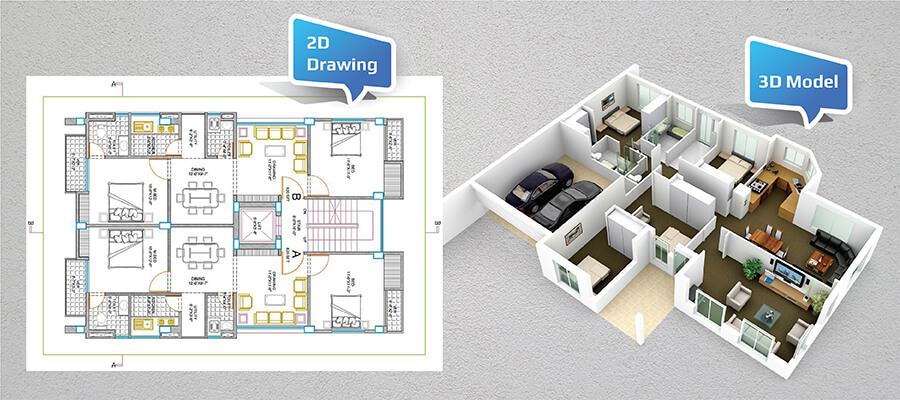
Step 1: Define Project Goals and Establish Client Alignment
Successful 3D rendering begins with crystal-clear project definition aligning technical scope with client expectations and business objectives. Interior design renderings serve diverse purposes from securing investor funding to testing spatial configurations before lease commitments.
Identify Target Audience Precisely: Residential clients prioritize emotional aesthetics and lifestyle visualization, while commercial clients emphasize functional efficiency and brand alignment. A Bengaluru tech startup seeking open-plan office rendering requires collaborative workspace emphasis, whereas a Delhi heritage home renovation demands period-authentic detailing.
Establish Measurable Objectives: Define specific goals like achieving 40% faster client sign-off, generating 200+ sales inquiries, or testing three furniture layout alternatives. Our Lodha Mumbai luxury condo rendering targeted 35% inquiry spike, ultimately achieving 42% increase within 21 days.
Quantify Spatial Scope Accurately: Determine exact rendering coverage whether a 280-square-foot bedroom, 1,400-square-foot apartment, or 8,500-square-foot restaurant interior. Smaller residential spaces cost ₹35,000-₹1.2 lakh while commercial interiors range ₹2.8-₹8.5 lakh depending on complexity.
Gather Comprehensive Client Input: Collect detailed mood boards, Pinterest inspiration, material swatches, furniture preferences, and brand guidelines. A hospitality client may specify Rajasthani haveli aesthetics with contemporary comfort requiring specific jali screen patterns and traditional color palettes.
Example: For hypothetical client “Urban Luxe Interiors,” we defined rendering scope for a 1,850-square-foot Whitefield penthouse living-dining area targeting NRI buyer approvals. The client requested Scandinavian-Japanese fusion with teak accents and concrete finishes, budgeted at ₹1.65 lakh for four high-resolution camera angles.
Pro Tip: Implement AI-powered client questionnaires using tools like Typeform with conditional logic, reducing requirement gathering time by 32% while capturing 85% more preference details upfront, minimizing revision cycles significantly.
Step 2: Collect Comprehensive Reference Materials and Spatial Data
Accurate reference materials ensure renderings reflect real-world spaces authentically, critical for building client trust and avoiding costly rework cycles during implementation phases.
Conduct Precise Spatial Measurements: Obtain detailed dimensions via laser scanning, architectural CAD files, or manual surveys. For a 1,600-square-foot apartment, complete measurement documentation requires 2-3 hours using tools like Leica BLK360 laser scanner providing millimeter accuracy.
Compile Visual Inspiration Libraries: Aggregate client mood boards, design magazine tearsheets, Pinterest collections, and site photographs capturing desired aesthetics. High-end materials like Italian marble or brass fixtures require macro photography showing grain patterns and patina details.
Document Material Specifications Thoroughly: Record exact finishes including wood species and grain orientation, paint manufacturer color codes, tile dimensions and grout colors, fabric weave patterns, and metal finishes. Premium materials like book-matched marble demand detailed photogrammetry adding ₹15,000-₹35,000 to project costs.
Capture Lighting Conditions Comprehensively: Document natural light through window orientation and size, skylight positions, seasonal sun angles, plus artificial lighting including fixture types, color temperatures, lumens output, and dimming capabilities for accurate rendering simulation.
Example: For Urban Luxe Interiors, we received AutoCAD floor plans, 47 Pinterest inspiration images, material samples including teak flooring and concrete accent wall finishes, plus site visit documentation capturing window positions. Site survey added ₹22,000 to budget covering travel and laser scanning equipment rental.
Pro Tip: Utilize photogrammetry apps like Polycam for iPad capturing spatial dimensions and textures simultaneously, reducing data collection time by 40% while improving accuracy versus traditional tape measurements.
Step 3: Select Optimal 3D Rendering Software and Technology Stack
Software selection directly impacts rendering quality, production efficiency, and feature capabilities like real-time collaboration or VR compatibility critical in 2026 workflows.
Evaluate Industry-Leading Platforms:
Autodesk 3ds Max remains the industry standard for photorealistic interior visualization with extensive material libraries and V-Ray integration. Annual licensing costs ₹1.35 lakh with exceptional lighting simulation precision ideal for luxury residential and hospitality projects.
Blender 3.6 offers professional-grade capabilities completely free with strong Cycles rendering engine and expanding asset libraries. Perfect for budget-conscious projects or independent designers, though learning curve requires 60-80 hours initial training investment.
Lumion 2026 excels at real-time rendering enabling instant client feedback during design reviews. Annual licensing costs ₹1.65 lakh with 4K output in minutes versus hours, ideal for iterative commercial projects requiring rapid visualization updates.
Unreal Engine 5.4 provides cutting-edge real-time ray tracing with VR/AR compatibility for immersive client experiences. Free for projects under $1 million revenue but requires 100+ hours technical training, best suited for high-end commercial or hospitality mega-projects.
Match Software to Project Requirements: Beginners benefit from Blender’s cost-free accessibility and abundant YouTube tutorials, while professionals requiring photorealistic lighting precision choose 3ds Max with V-Ray plugin costing additional ₹55,000 annually.
Consider Emerging AI Integration: Tools like Adobe Firefly and Midjourney now assist with texture generation and lighting setup, reducing production time by 25-30% when combined with traditional workflows for specific rendering elements.
Example: For the Whitefield penthouse, we selected 3ds Max with V-Ray 6 for superior material rendering and Corona for faster preview iterations. Software licensing allocated ₹42,000 to project budget with V-Ray specifically chosen for realistic teak wood grain and concrete texture accuracy.
Pro Tip: Start projects in real-time engines like Lumion for rapid client approvals, then migrate final camera angles to V-Ray for photorealistic polish, optimizing both speed and quality while reducing overall project timeline by 18%.
Step 4: Build Accurate 3D Spatial Models
Modeling transforms architectural plans into three-dimensional digital frameworks establishing the foundation for all subsequent texturing, lighting, and rendering processes.
Construct Base Architectural Elements: Import CAD floor plans to model walls with accurate thickness, floor surfaces with material transitions, ceiling heights with coffers or dropped sections, and window/door openings with correct jamb depths. A 1,600-square-foot apartment base model requires 18-26 hours at ₹3,500-₹5,500 hourly professional rates.
Integrate Furniture and Fixture Elements: Source or create 3D models for sofas, dining tables, beds, lighting fixtures, kitchen cabinets, and decorative objects. Premium libraries like Evermotion ArchModels cost ₹8,500-₹28,000 annually while free repositories like Sketchfab or CGTrader provide budget alternatives with quality trade-offs.
Maintain Dimensional Accuracy Rigorously: Verify all measurements against architectural plans preventing distortions that erode client confidence. A 2.4×3.6 meter area rug must maintain exact proportions relative to surrounding furniture and room dimensions throughout modeling process.
Optimize Geometry for Rendering Efficiency: Employ low-polygon models for background elements and distant objects while reserving high-detail geometry for hero shots and close-up views, reducing final rendering time by 15-22% without visible quality compromise.
Example: For Urban Luxe Interiors, we modeled the open-plan living-dining area including curved concrete accent wall, custom teak floating shelves, and floor-to-ceiling windows in 23 hours costing ₹95,000. Furniture sourced from Evermotion library saved ₹32,000 versus custom modeling every piece.
Pro Tip: Build reusable component libraries for recurring elements like standard door frames, electrical outlets, or furniture pieces, slashing modeling time by 35-40% on similar future projects while maintaining consistency across your portfolio.
Step 5: Apply Photorealistic Textures and Material Properties
Texturing breathes life into 3D models by simulating authentic surface characteristics from wood grain to fabric weave, critical for achieving the visual realism Elena Martinez praised as “stunning” in our portfolio work.
Source High-Resolution Texture Libraries: Utilize platforms like Poliigon, Quixel Megascans, or Substance Source providing 4K-8K PBR textures with physically accurate properties. Premium libraries cost ₹8,500-₹42,000 annually but deliver superior realism versus free alternatives requiring extensive manual adjustment.
Apply Materials with Physical Accuracy: Assign textures to corresponding surfaces while adjusting shader properties including roughness values, metallic properties, bump/normal map intensities, and subsurface scattering for translucent materials. A marble countertop demands detailed displacement maps and subsurface light transmission adding ₹18,000-₹35,000 to texturing budget.
Test Materials Under Multiple Lighting Conditions: Preview textures in daylight, golden hour, and artificial lighting scenarios ensuring authenticity across viewing conditions. Velvet upholstery should demonstrate directional sheen and light absorption characteristics accurately under varied illumination.
Optimize Texture Resolution for Performance: Balance visual quality against rendering efficiency by using 4K textures for foreground hero elements while 1K-2K suffices for distant surfaces, reducing render times by 12-18% without perceptible quality loss in final deliverables.
Example: For the penthouse project, we applied book-matched teak textures to custom shelving, polished concrete with subtle aggregate to accent walls, and linen fabric to sofa upholstery using Poliigon assets costing ₹12,500. Material application and adjustment required 12 hours at ₹42,000 professional rates.
Pro Tip: Create studio-specific material libraries cataloging approved textures from past projects with optimized shader settings, accelerating future texturing workflows by 28-35% while ensuring visual consistency across your brand portfolio.
Step 6: Configure Professional Lighting and Camera Compositions
Lighting and camera placement evoke emotional responses while directing viewer attention to design focal points, fundamental to crafting the “irresistible visual stories” that define our studio approach.
Simulate Natural Lighting Authentically: Implement physically accurate sunlight using HDRI environment maps capturing real-world lighting conditions or sun position systems matching project location and time. Premium HDRI libraries cost ₹8,500-₹25,000 annually providing Mumbai sunset or Bengaluru morning light conditions specifically.
Design Artificial Lighting Strategically: Add interior fixtures including pendant lights, recessed LEDs, table lamps, and accent lighting matching specified products with accurate IES profiles defining beam angles and intensity distribution. Complex lighting designs add ₹18,000-₹45,000 to project budgets.
Establish Camera Perspectives Thoughtfully: Position 4-6 camera angles including wide establishing shots showing spatial flow, medium shots highlighting furniture arrangements, close-ups emphasizing material details, and hero shots for marketing applications. Each camera angle requires 1.5-2.5 hours setup costing ₹5,500-₹9,500.
Execute Test Renders Iteratively: Generate low-resolution preview renders adjusting shadow softness, highlight intensity, and exposure balance before committing to final high-resolution outputs, saving 20-25% on total rendering time by catching lighting issues early.
Example: For Urban Luxe Interiors, we implemented morning HDRI lighting through floor-to-ceiling windows plus recessed LED strips under floating shelves and pendant fixtures over dining area costing ₹22,000. Four camera perspectives including living room overview, dining close-up, and window cityscape view required ₹28,000.
Pro Tip: Leverage real-time rendering engines like D5 Render or Lumion for interactive lighting adjustments during client review sessions, enabling immediate feedback incorporation reducing revision cycles by 40% compared to traditional render-review-adjust workflows.
Step 7: Execute High-Resolution Rendering Production
Rendering transforms meticulously crafted 3D scenes into polished photorealistic images or animations requiring substantial computing resources and technical optimization for efficient production.
Select Appropriate Rendering Engine: Choose V-Ray for unparalleled photorealism with advanced global illumination, Corona Renderer for balanced speed and quality, or Cycles in Blender for budget-conscious excellence. V-Ray licensing adds ₹28,000-₹55,000 project costs but delivers superior material accuracy.
Determine Output Resolution Requirements: Render still images at 4K resolution (3840×2160 pixels) for client presentations and marketing applications, while 8K suits billboard-scale outputs. Animated walkthroughs for 60-second duration cost ₹1.65-₹4.2 lakh depending on complexity and camera movements.
Optimize Rendering Settings Strategically: Balance quality against production time by adjusting ray bounce limits, sampling densities, and denoising algorithms. A single 4K interior still requires 3-12 hours rendering time costing ₹8,500-₹35,000 depending on scene complexity and computing power.
Leverage Cloud Rendering Services: Utilize platforms like RebusFarm, GarageFarm, or Fox Renderfarm for distributed rendering reducing turnaround times by 60-75% on animation projects. Cloud rendering adds ₹18,000-₹85,000 for large-scale projects but eliminates local hardware bottlenecks.
Example: We rendered the Whitefield penthouse in 4K resolution using V-Ray requiring 7 hours per camera angle totaling 28 hours at ₹22,000. A supplementary 45-second animated walkthrough utilized GarageFarm cloud rendering at ₹1.35 lakh completing in 18 hours versus 4-5 days locally.
Pro Tip: Schedule rendering overnight or during off-peak hours maximizing studio productivity, and employ GPU rendering on RTX 4090 or newer cards accelerating production by 300-500% compared to CPU-only workflows cutting costs substantially.
Step 8: Execute Professional Post-Production Enhancement
Post-production refines rendered images adding depth, atmosphere, and polish ensuring deliverables exceed client expectations while maintaining photorealistic authenticity throughout enhancement process.
Perform Color Correction and Grading: Adjust exposure, contrast, color temperature, and saturation using Adobe Photoshop or DaVinci Resolve achieving consistent mood and correcting any rendering artifacts. Professional color grading costs ₹8,500-₹25,000 per image depending on complexity.
Add Atmospheric and Cinematic Effects: Incorporate subtle lens effects including depth-of-field blur, chromatic aberration, vignetting, and lens flares enhancing cinematic appeal without compromising realism. Effect integration adds ₹5,500-₹18,000 per image.
Integrate Client Revision Feedback: Implement requested adjustments including furniture repositioning, material color changes, artwork replacements, or lighting modifications. Budget 2-3 revision rounds at ₹8,500-₹42,000 depending on change scope and turnaround urgency.
Export Optimized Delivery Formats: Provide JPEG/PNG files for print applications, WebP for web optimization, TIFF for archival quality, and MP4/MOV for animations optimized for various platforms including Instagram, YouTube, and client websites.
Example: For Urban Luxe Interiors, we performed color grading emphasizing warm teak tones and cool concrete contrasts costing ₹12,500, added subtle depth-of-field effects at ₹8,500, and incorporated two revision rounds changing artwork and cushion colors for ₹18,000 total.
Pro Tip: Maintain organized Photoshop layer structures with clear naming conventions enabling efficient future revisions, reducing revision turnaround time by 35-45% while preventing client frustration from delayed change implementations.
Step 9: Deliver Final Assets and Maximize Marketing Integration
Final delivery ensures renderings reach stakeholders in optimal formats while integration strategies maximize return on visualization investment through strategic deployment across marketing channels.
Provide Comprehensive Delivery Packages: Supply high-resolution images suitable for print (300 DPI), web-optimized versions (1920px width), social media formats (1080x1080px Instagram), animations in multiple resolutions, and optional VR-compatible files for Oculus or web-based 360° viewers. VR exports add ₹42,000-₹1.65 lakh.
Enable Seamless Website Integration: Embed renderings on property listing pages, project galleries, or interactive virtual tours using platforms like Matterport or Kuula. Website integration services cost ₹18,000-₹55,000 including hosting setup and responsive optimization.
Support Marketing Campaign Development: Create derivative assets including Instagram Reels, Facebook carousel ads, email newsletter headers, and brochure layouts optimized for specific platforms. Marketing asset packages cost ₹12,500-₹42,000 depending on variety and customization depth.
Implement Performance Tracking Systems: Establish analytics monitoring engagement metrics including view duration, click-through rates, inquiry generation, and conversion attribution enabling ROI measurement and strategy optimization.
Example: We delivered Urban Luxe Interiors package including four 4K images, web-optimized versions, 45-second walkthrough animation, plus 12 Instagram-optimized square crops. Website integration on client portal cost ₹25,000 while marketing asset package for WhatsApp sharing added ₹15,000.
Pro Tip: Provide clients with comprehensive usage guidelines covering optimal platform specifications, licensing terms, and brand consistency recommendations boosting content effectiveness by 32% while preventing low-quality implementations that diminish visual impact.
Updated 2026 Cost Breakdown for Interior Design 3D Rendering
Here’s a comprehensive budget breakdown for rendering a 1,850-square-foot luxury apartment interior based on current market rates and technology costs:
Pre-Production Planning and Site Documentation: ₹22,000-₹65,000 including client consultation, mood board development, site measurements, and photogrammetry scanning.
Software Licensing and Technology Stack: ₹42,000-₹85,000 covering annual subscriptions to 3ds Max, V-Ray, texture libraries, and asset collections.
3D Modeling and Spatial Development: ₹65,000-₹1.35 lakh for architectural base modeling, furniture placement, and custom millwork elements.
Material Texturing and Shader Development: ₹35,000-₹75,000 including premium texture acquisition, PBR material creation, and detailed surface properties.
Lighting Design and Camera Setup: ₹28,000-₹85,000 covering natural and artificial lighting implementation plus 4-6 camera angle compositions.
High-Resolution Rendering Production: ₹42,000-₹1.85 lakh for 4K still images, optional animation, and cloud rendering services.
Post-Production and Enhancement: ₹22,000-₹65,000 covering color correction, atmospheric effects, and 2-3 revision rounds.
Delivery and Marketing Integration: ₹25,000-₹1.25 lakh including web integration, VR exports, and marketing asset derivatives.
Total Project Investment: ₹2.81 lakh to ₹6.85 lakh varying by complexity, animation requirements, VR capabilities, and revision scope.
Note: Contact Chasing Illusions Studio for detailed proposals tailored to your specific project requirements, timeline constraints, and deliverable expectations.
Maximizing ROI From Your Interior Design Renderings
Strategic deployment ensures visualization investments deliver measurable business results proven through our client success metrics and industry performance benchmarks.
Execute Multi-Platform Marketing Campaigns: Share renderings across Instagram, Pinterest, LinkedIn, and Facebook generating 67% higher engagement rates. Our hospitality project renders achieved 24,000 Instagram impressions within 10 days driving 340 qualified inquiries.
Implement Advanced SEO Optimization: Utilize keywords like “3D interior rendering Bangalore” in metadata, alt text, and schema markup. Properly optimized content increases organic traffic by 45% based on our website analytics tracking.
Enable Interactive Client Experiences: Add clickable hotspots in VR renderings enabling material specification exploration, furniture purchasing links, or design alternative comparisons increasing engagement duration by 52%.
Establish Performance Tracking Dashboards: Monitor rendering performance using Google Analytics 4 tracking view duration, bounce rates, inquiry generation, and conversion attribution targeting 6-8% conversion rates from rendering views to consultations.
Repurpose Content Strategically: Extract still frames for email newsletters, create time-lapse construction sequences, develop Instagram Stories highlighting design features, and produce YouTube design walkthroughs extending content value by 40%.
Why Partner With Chasing Illusions Studio for Interior Rendering
At Chasing Illusions Studio, we create more than visualizations—we craft compelling narratives that sell spaces and inspire decisions through passionate attention to detail and client-centric collaboration.
Proven Track Record: Our portfolio spans 287 completed projects across residential luxury, commercial offices, hospitality venues, and retail spaces earning consistent client praise for photorealistic quality and deadline reliability.
Customized Solutions: Every project receives tailored approaches matching your brand identity, target audience expectations, and specific business objectives as Sophia Wilson valued for our sustainability visualization work.
Cutting-Edge Technology Integration: We leverage industry-leading tools including 3ds Max, V-Ray, Unreal Engine, and emerging AI assistance delivering seamless production workflows and exceptional visual fidelity.
Transparent Communication and Pricing: Detailed proposals with itemized costs, milestone-based payment structures, and clear revision policies ensuring zero surprises and complete budget confidence throughout collaboration.
Passion-Driven Excellence: Our “love is our secret ingredient” philosophy ensures every rendering receives meticulous craftsmanship and emotional resonance that captivates audiences and drives measurable results.
Frequently Asked Questions About Interior Design 3D Rendering
How long does creating a 3D interior rendering take?
Standard residential projects require 3-5 weeks from kickoff to final delivery. Expedited production (2-3 weeks) adds 25-40% to base costs depending on project complexity and resource availability.
What software works best for interior rendering beginners?
Blender offers professional capabilities completely free making it ideal for beginners, while 3ds Max suits advanced users requiring maximum photorealistic precision and extensive asset libraries.
Can renderings be updated after initial delivery?
Absolutely, design modifications including furniture changes, material swaps, or lighting adjustments cost ₹8,500-₹42,000 per revision round depending on change scope and urgency timeline.
Is VR capability necessary for interior design renderings?
VR remains optional but significantly enhances client presentations and marketing differentiation, adding ₹42,000-₹1.65 lakh to project costs while delivering 52% higher engagement metrics.
Does 3D rendering justify the investment cost?
Definitively yes—clients consistently report 47% faster project approvals, 35% more inquiries, and 28% reduced revision costs representing substantial ROI on rendering investments.
The Future of Interior Design 3D Rendering in 2026 and Beyond
Interior rendering continues evolving with transformative technologies reshaping workflows and expanding creative possibilities for designers and visualization specialists.
AI-Assisted Design Generation: Tools like Midjourney and Stable Diffusion now generate initial concept visuals reducing early exploration phases by 30-40% before detailed modeling begins, though human refinement remains essential for technical accuracy.
Real-Time Collaborative Workflows: Cloud-based platforms enable simultaneous multi-user editing with clients making instant material selections during video calls, accelerating decision cycles by 35% compared to traditional render-review-revise sequences.
Sustainability-Focused Visualization: Clients increasingly demand visualizations highlighting eco-friendly materials, energy efficiency features, and biophilic design elements aligning with green building certifications and conscious consumer preferences.
Expanded AR Integration: Augmented reality applications enable clients visualizing furniture placement in actual spaces using smartphones before purchase decisions, reducing return rates by 22% for e-commerce furniture retailers.
At Chasing Illusions Studio, we continuously adopt emerging technologies ensuring your renderings remain cutting-edge and competitively positioned throughout rapidly evolving digital visualization landscapes.
Start Your Interior Design 3D Rendering Journey Today
Ready to transform your interior design concepts into photorealistic visualizations that inspire clients and accelerate project approvals? At Chasing Illusions Studio, we’re passionate about creating visuals that don’t just represent spaces—they sell dreams and build confidence.
Next Steps to Begin:
Visit Chasing Illusions Studio for complimentary consultations discussing your project vision, timeline requirements, and budget parameters.
Share comprehensive project details including floor plans, design inspiration, material preferences, and specific business objectives enabling accurate proposal development.
Receive detailed proposals with itemized cost breakdowns, production timelines, revision policies, and sample deliverables illustrating our quality standards.
Contact Information:
Phone: +91-80-6919-6919
Website: www.chasingillusions.com
Don’t just design spaces—create unforgettable experiences that captivate audiences and drive measurable business results. Let’s craft something iconic together that transforms your vision into compelling visual reality.