3D Rendering vs 3D Modeling: The Complete Guide to Understanding the Difference
If you’ve ever been confused by the terms “3D rendering” and “3D modeling,” you’re not alone. These two concepts are frequently used interchangeably in the architecture, design, and animation industries, yet they represent distinctly different stages of the 3D content creation process. Understanding the difference is crucial whether you’re a real estate developer planning a project launch, an architect communicating with clients, or a business owner investing in 3D visualization services.
[web_stories title=”true” excerpt=”false” author=”false” date=”false” archive_link=”true” archive_link_label=”All Web Stories” circle_size=”150″ sharp_corners=”true” image_alignment=”left” number_of_columns=”1″ number_of_stories=”8″ order=”DESC” orderby=”post_title” view=”carousel” /]
This comprehensive guide will demystify both processes, explain how they work together, and help you make informed decisions about which services you need for your specific project. By the end, you’ll understand not just the technical differences, but also the practical implications for your budget, timeline, and project outcomes.
What is 3D Modeling?
3D modeling is the foundational process of creating a three-dimensional digital representation of an object or space using specialized software. Think of it as digital sculpting or blueprint creation in a virtual environment. The result is a wireframe structure called a “3D model” that exists in three-dimensional space with length, width, and height.
The Core Elements of 3D Modeling
Vertices, Edges, and Faces
At its most basic level, a 3D model consists of:
>Vertices: Individual points in 3D space
>Edges: Lines connecting vertices
>Faces: Flat surfaces formed by connecting edges
>Polygons: The basic building blocks, typically triangles or quadrilaterals
These elements combine to create the geometry that defines the shape and form of objects.
Modeling Techniques
3D artists employ various modeling techniques depending on the project requirements:
Polygonal Modeling: The most common method, building objects from individual polygons (usually triangles and quads). Ideal for architectural elements, furniture, and hard-surface objects.
NURBS Modeling: Uses mathematical curves to create smooth, organic surfaces. Perfect for automotive design, product design, and objects requiring smooth curves.
Sculpting: Similar to working with clay, artists push, pull, and shape digital material. Excellent for character creation, organic forms, and detailed textures.
Parametric Modeling: Uses parameters and rules to define geometry, allowing for easy modifications. Common in architectural and engineering applications.
Procedural Modeling: Uses algorithms to generate complex geometry automatically. Useful for creating large-scale environments, forests, or cities.
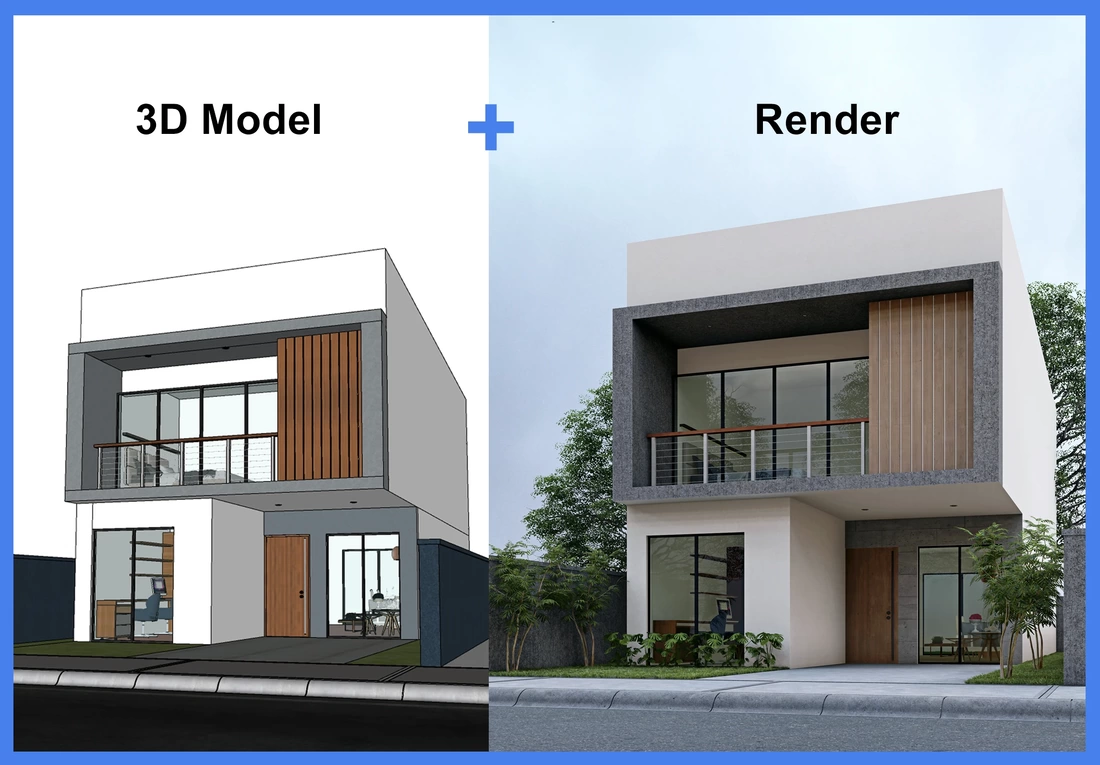
What 3D Models Look Like
A raw 3D model typically appears as:
–>A wireframe structure showing only edges and vertices
–>A grayscale mesh without colors or materials
–>Basic geometry without lighting or shadows
–>A technical blueprint rather than a photorealistic image
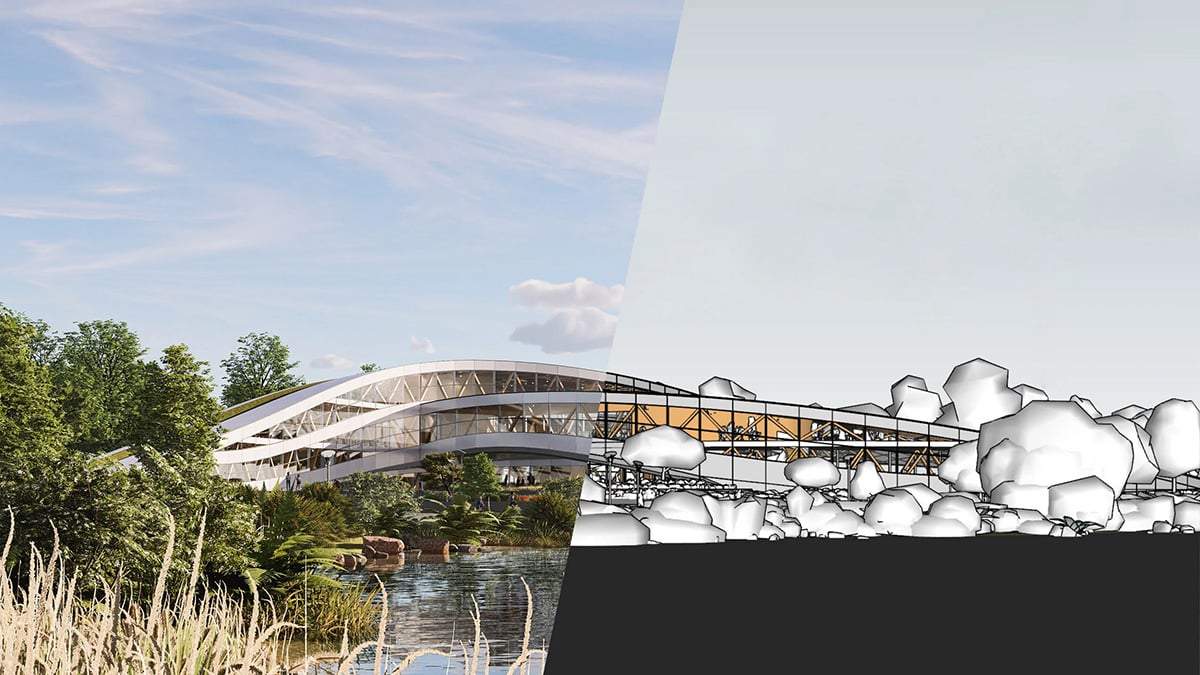
At this stage, the model has no colors, textures, lighting, or realistic appearance. It’s essentially a digital skeleton waiting to be brought to life through the rendering process.
Common 3D Modeling Software
Professional 3D modeling is accomplished using specialized software:
Autodesk Maya: Industry standard for animation and complex modeling Blender: Open-source powerhouse with comprehensive modeling tools 3ds Max: Popular for architectural visualization and game development SketchUp: User-friendly option for architectural modeling Rhino: Preferred for industrial and product design ZBrush: Leading software for digital sculpting Cinema 4D: Excellent for motion graphics and product visualization
Industries Using 3D Modeling
3D modeling has become indispensable across numerous sectors:
Architecture: Creating building designs, spatial layouts, and structural elements Product Design: Developing prototypes for manufacturing Gaming: Building characters, environments, and assets Film & Animation: Creating digital characters and sets Medical: Modeling organs, surgical procedures, and medical devices Engineering: Designing mechanical parts and assemblies Fashion: Creating virtual clothing and accessories Jewelry: Designing pieces before physical production
What is 3D Rendering?
3D rendering is the process of converting 3D models into 2D images or animations with realistic lighting, colors, textures, and shadows. It’s the transformation that turns a wireframe blueprint into a photorealistic visualization that looks like a photograph or video.
Think of rendering as the photography stage of 3D creation. Just as a photographer captures a real scene with a camera, rendering software “photographs” the digital 3D scene with virtual cameras, lights, and materials.
The Rendering Process Explained
Step 1: Scene Setup
Before rendering begins, artists set up the virtual environment:
–>Position the 3D model in the scene
–>Add virtual cameras from desired viewpoints
–>Place and configure light sources
–>Set up the virtual environment (sky, ground, surroundings)
Step 2: Material Application
This critical stage involves:
–>Applying textures (wood grain, metal surface, fabric patterns)
–>Defining material properties (reflectivity, transparency, roughness)
–>Setting up procedural materials (realistic water, glass, metals)
–>Creating bump maps and normal maps for surface detail
Step 3: Lighting Design
Lighting makes or breaks a render:
–>Natural Lighting: Sun simulation, sky illumination, HDRI environments
–>Artificial Lighting: Interior lights, spotlights, area lights
–>Ambient Lighting: Overall scene illumination
–>Global Illumination: Realistic light bouncing between surfaces
Step 4: Camera Settings
Virtual camera configuration includes:
–>Field of view and focal length
–>Depth of field effects (focus and blur)
–>Camera angle and composition
–>Exposure and white balance
Step 5: Render Calculation
The rendering engine calculates:
–>How light interacts with surfaces
–>Reflections and refractions
–>Shadows and ambient occlusion
–>Color bleeding and caustics
–>Atmospheric effects
Step 6: Post-Processing
Final enhancements include:
–>Color correction and grading
–>Adding atmosphere and depth
–>Enhancing contrast and details
–>Compositing multiple render passes
–>Adding effects like lens flares or vignettes
Types of Rendering
Real-Time Rendering
Used in video games, virtual reality, and interactive applications where images must be generated instantly. Prioritizes speed over absolute photorealism, though modern game engines like Unreal Engine are achieving near-photorealistic quality.
Offline Rendering
Used for architectural visualization, product marketing, and film production, where quality trumps speed. Can take minutes to hours per frame but produces photorealistic results indistinguishable from photographs.
Ray Tracing
The gold standard for realistic rendering simulates how light rays travel through a scene, bounce off surfaces, and interact with materials. Computationally intensive but produces the most accurate results.
Path Tracing
An advanced form of ray tracing that simulates all possible light paths for ultimate realism. Used in high-end architectural visualization and film production.
Rasterization
Faster rendering method that projects 3D geometry onto a 2D screen. Common in real-time applications and previews.
Popular Rendering Engines
V-Ray: Industry standard for architectural visualization, known for photorealistic quality Corona Renderer: User-friendly with excellent results, popular among architects Arnold: High-end renderer used in film and animation production Octane Render: GPU-accelerated rendering for fast, high-quality results Redshift: Fast GPU renderer with production-quality output Cycles: Open-source renderer integrated with Blender Mental Ray: Classic renderer still used in many pipelines KeyShot: Specialized in product visualization with real-time workflow Lumion: Real-time architectural visualization with instant results
The Key Differences: 3D Modeling vs 3D Rendering
Understanding these differences helps you communicate effectively with 3D professionals and make informed project decisions 1. Purpose and Function
3D Modeling: Creates the digital structure and geometry
–>Defines what objects look like (shape, form, proportions)
–>Establishes spatial relationships
–>Provides the foundation for all subsequent work
3D Rendering: Makes the model visually appealing and realistic
–>Defines how objects appear (colors, materials, lighting)
–>Creates the final visual output
–>Transforms technical data into compelling imagery
2. Output Format
3D Modeling: Produces editable 3D files
–>File formats: .obj, .fbx, .3ds, .max, .blend, .skp
–>Contains geometric data, not final images
–>Can be opened, edited, and modified repeatedly
–>Exists in 3D space with no fixed viewpoint
3D Rendering: Produces final 2D images or videos
–>File formats: .jpg, .png, .tiff, .mp4, .mov
–>Fixed viewpoint and appearance
–>Cannot be directly edited (requires re-rendering)
–>Standard image/video files viewable by anyone
3. Technical Skills Required
3D Modeling: Requires understanding of:
–>Geometry and spatial relationships
–>Topology and polygon flow
–>Scale and proportions
–>Technical accuracy
–>Software-specific tools and workflows
3D Rendering: Requires understanding of:
–>Photography principles (composition, lighting, exposure)
–>Material properties and physics
–>Color theory
–>Artistic vision
–>Rendering engine capabilities
4. Time Investment
3D Modeling: Time varies by complexity
–>Simple object: 1-4 hours
–>Detailed architectural model: 2-5 days
–>Complex character: 1-2 weeks
–>Full building interior: 1-3 weeks
3D Rendering: Depends on quality and resolution
–>Preview render: Seconds to minutes
–>High-quality still image: 30 minutes to 6 hours per image
–>Photorealistic render: 2-12 hours per image
–>Animation: Hours to days depending on length and quality
5. Cost Implications
3D Modeling Costs (India, 2026):
–>Basic architectural model: ₹15,000 – ₹40,000
–>Detailed interior model: ₹30,000 – ₹80,000
–>Product model: ₹10,000 – ₹50,000
–>Character model: ₹25,000 – ₹1,50,000
3D Rendering Costs (India, 2026):
–>Exterior architectural render: ₹8,000 – ₹50,000
–>Interior render: ₹10,000 – ₹35,000
–>Product render: ₹5,000 – ₹25,000
–>Walkthrough animation (per minute): ₹40,000 – ₹1,50,000
6. Revision Process
3D Modeling Revisions:
–>Relatively easy to modify geometry
–>Changes affect the base structure
–>Can impact all subsequent rendering work
–>Fundamental changes may require starting over
3D Rendering Revisions:
–>Can adjust materials, lighting, and camera without re-modeling
–>Color and atmosphere changes are relatively quick
–>Adding/removing objects requires scene modification
–>Re-rendering needed for any changes
7. Software Requirements
3D Modeling Software Characteristics:
–>Focused on geometry creation and manipulation
–>Tools for precision and measurement
–>Polygon editing capabilities
–>Moderate hardware requirements
3D Rendering Software Characteristics:
–>Focused on material and lighting setup
–>Physics-based calculations
–>Requires significant computing power
–>Often GPU or CPU intensive
How 3D Modeling and Rendering Work Together
While distinct processes, modeling and rendering are inseparable partners in creating compelling 3D visualizations. Understanding their relationship is crucial for project planning.
The Complete 3D Visualization Workflow
Phase 1: Conceptualization (Days 1-2)
–>Client brief and requirements gathering
–>Reference collection and mood boards
–>Initial sketches and concept art
–>Style and direction establishment
Phase 2: 3D Modeling (Days 3-10)
–>Creating base geometry from plans/sketches
–>Detailing and refinement
–>Adding architectural elements
–>Modeling furniture and accessories
–>Client review and approval of model
Phase 3: Texturing and Materials (Days 11-13)
–>UV mapping (preparing model for textures)
–>Applying materials and textures
–>Creating realistic surface properties
–>Fine-tuning material details
Phase 4: Scene Setup (Days 14-15)
–>Positioning objects in scene
–>Camera placement and composition
–>Lighting design and setup
–>Environment creation
Phase 5: Rendering (Days 16-18)
–>Test renders and adjustments
–>Final high-resolution rendering
–>Multiple camera angles if needed
–>Quality assurance checks
Phase 6: Post-Production (Days 19-20)
–>Color correction and grading
–>Adding people, vehicles, landscaping
–>Final touch-ups and enhancements
–>Delivery in required formats
Why You Need Both
Scenario 1: Architectural Visualization
For a residential real estate project, you need:
–>Modeling: To create accurate building geometry, room layouts, structural elements
–>Rendering: To show how it will look with materials, lighting, landscaping, and atmosphere
Without proper modeling, renders will be geometrically incorrect. Without quality rendering, even perfect models won’t sell the vision.
Scenario 2: Product Launch
For a new consumer product:
–>Modeling: To design the product form, ensure manufacturing feasibility
–>Rendering: To create marketing images showing the product in various contexts, colors, and lighting
Scenario 3: Animation Project
For a 3D walkthrough video:
–>Modeling: To build all environments, objects, and characters
–>Rendering: To convert each frame of animation into final video footage with materials and lighting
Common Misconceptions
Misconception 1: “Rendering is Just Pressing a Button”
Reality: While software does automate calculations, rendering requires extensive artistic setup. Lighting design alone can take hours of careful adjustment. Material creation demands understanding of physics and art. Camera composition requires photographic expertise.
Misconception 2: “A Good Model Renders Itself”
Reality: Even a perfectly modeled scene will look terrible without proper lighting, materials, and rendering setup. The rendering stage is where artistic vision truly comes alive.
Misconception 3: “I Can Just Hire a Modeler for Complete Visualizations”
Reality: While some professionals do both, modeling and rendering require different skill sets. Architectural modelers may not have the artistic sensibility for compelling renders. Rendering artists may not have the technical precision for accurate modeling.
Misconception 4: “Rendering Always Takes Days”
Reality: With modern real-time rendering engines like Lumion or Unreal Engine, near-photorealistic results can be achieved in minutes. However, the highest quality architectural visualizations using ray tracing can indeed take hours per frame.
Misconception 5: “3D Models Can Be Reused for Any Type of Rendering”
Reality: While models can be reused, they often need optimization for different purposes. A model built for still renders may have too many polygons for real-time use. A game model may lack detail for close-up photorealistic renders.
Choosing the Right Service for Your Needs
Different project goals require different approaches to modeling and rendering.
When You Need 3D Modeling Services
Use Cases:
–>Product design and prototyping before manufacturing
–>Creating digital twins of existing buildings or objects
–>Developing architectural plans and spatial layouts
–>Building game assets or animation characters
–>Preparing models for 3D printing
–>Creating a library of reusable digital assets
Questions to Ask:
–>Will you need the model for multiple purposes (renders, animation, VR)?
–>Do you need the source files for future modifications?
–>Is geometric accuracy critical (engineering, manufacturing)?
–>Will the model be used across different software platforms?
When You Need 3D Rendering Services
Use Cases:
–>Marketing materials for real estate projects
–>Product photography alternatives
–>Architectural competition submissions
–>Interior design client presentations
–>Website and brochure imagery
–>Social media content
–>Before construction visualization
Questions to Ask:
–>How many different views or angles do you need?
–>What resolution and quality level is required?
–>Will images be used for print or digital display?
–>Do you need animation or just still images?
When You Need Both
Most professional visualization projects require integrated modeling and rendering services:
Complete Architectural Visualization Packages
–>Full building modeling from plans
–>Multiple exterior and interior renders
–>Day and night views
–>Multiple camera angles
–>Walkthrough animations
Product Launch Campaigns
–>Product modeling with manufacturing precision
–>Lifestyle renders showing product in use
–>Multiple color and material variations
–>360-degree product views
Real Estate Marketing Suites
–>Accurate building and interior modeling
–>Photorealistic renders for sales materials
–>Virtual tours and walkthroughs
–>Floor plan visualizations
The Impact of Technology on Modeling and Rendering
The 3D industry is evolving rapidly, with new technologies reshaping both modeling and rendering workflows.
Real-Time Rendering Revolution
Game engines like Unreal Engine and Unity are transforming architectural visualization:
Benefits:
–>Instant feedback during design process
–>Interactive walkthroughs clients can explore
–>Changes visible immediately without re-rendering
–>Reduced production time from weeks to days
Limitations:
–>Still doesn’t match offline rendering quality for some use cases
–>Requires more powerful hardware
–>Steeper learning curve for traditional visualization artists
AI and Machine Learning
Artificial intelligence is augmenting both processes:
In Modeling:
–>Automated object recognition and model generation from photos
–>Procedural content generation for large-scale environments
–>Intelligent topology optimization
–>Style transfer for quick design variations
In Rendering:
–>AI denoising for faster render times with less noise
–>Automated lighting setup suggestions
–>Upscaling and resolution enhancement
–>Style transfer and artistic effects
Cloud Computing
Cloud-based rendering farms are democratizing access to rendering power:
Advantages:
–>Render complex scenes without expensive local hardware
–>Parallel rendering of multiple frames simultaneously
–>Pay-per-use pricing model
–>Scalable capacity for tight deadlines
Popular Services:
–>RebusFarm
–>RenderStreet
–>GarageFarm
–>Amazon AWS rendering
–>Google Cloud rendering
Virtual Reality and Augmented Reality
VR and AR are creating new requirements for both modeling and rendering:
Modeling Considerations:
–>Optimized geometry for real-time VR performance
–>LOD (Level of Detail) systems for different viewing distances
–>Efficient topology to maintain frame rates
Rendering Considerations:
–>Stereoscopic rendering for both eyes
–>90+ fps requirements for comfortable VR experience
–>360-degree environment considerations
–>Real-time lighting and shadow updates
Cost-Benefit Analysis: Investing in 3D Visualization
Understanding the ROI of professional 3D modeling and rendering helps justify the investment.
Quantifiable Benefits
Faster Sales Cycles
–>Properties with 3D visualization sell 40% faster
–>Buyers make decisions earlier in the process
–>Reduced time carrying costs for developers
Premium Pricing
–>Professional visualization commands 8-15% price premiums
–>Perceived value increases significantly
–>Differentiation from competitors using basic photography or sketches
Reduced Construction Changes
–>Design issues caught in 3D before construction
–>25-30% reduction in costly on-site modifications
–>Better stakeholder alignment before breaking ground
Marketing Efficiency
–>One set of 3D renders serves multiple marketing channels
–>Eliminates need for expensive photography of unbuilt spaces
–>Assets reusable across campaigns
Approval Success
–>Planning authorities respond better to clear visualizations
–>35% improvement in first-submission approval rates
–>Faster permitting processes
When to Prioritize Quality Over Cost
High-Stakes Projects:
–>Luxury real estate where buyers expect perfect presentation
–>Architectural competitions against strong competition
–>Product launches with significant marketing budgets
–>Projects requiring investor buy-in or financing
When to Optimize for Budget:
–>Internal design reviews and iteration
–>Early-stage concept presentations
–>Multiple option comparisons
–>Portfolio additions for smaller projects
Working with 3D Professionals: Best Practices
Getting the best results from your 3D modeling and rendering investment requires effective collaboration.
Preparing Your Brief
For 3D Modeling Projects, provide:
–>Accurate CAD drawings, floor plans, elevations
–>Dimensional specifications and measurements
–>Technical drawings with detailed annotations
–>Reference images of similar projects
–>Specific requirements for model usage (rendering, animation, VR, 3D printing)
–>File format requirements
–>Level of detail needed
For 3D Rendering Projects, provide:
–>Complete 3D models or detailed drawings
–>Material specifications (flooring, walls, finishes)
–>Lighting preferences (time of day, mood)
–>Reference images showing desired style
–>Brand guidelines if applicable
–>Context information (surrounding environment)
–>Intended use and required resolution
Communication During Production
Milestone Reviews:
–>Approve base model geometry before detailing begins
–>Review material samples before full scene rendering
–>Check test renders before final high-resolution output
–>Provide feedback in structured, consolidated reviews
Revision Management:
–>Understand what’s included in initial pricing
–>Be specific about requested changes
–>Prioritize feedback from most to least important
–>Recognize the difference between refinements and scope changes
File Delivery and Ownership
Clarify Upfront:
–>What file formats will be delivered?
–>Are source files included or additional cost?
–>Can models be used for multiple purposes?
–>Are there usage restrictions or licensing terms?
–>Who owns intellectual property rights?
The Future of 3D Modeling and Rendering
The industry continues to evolve at a rapid pace, with several trends shaping its future.
Photogrammetry and 3D Scanning
Creating models from photographs and laser scans:
–>Faster creation of real-world objects and spaces
–>Extreme accuracy for heritage preservation
–>Integration with traditional modeling workflows
–>Challenges in cleanup and optimization
Neural Rendering
AI-generated photorealistic images from basic 3D data:
–>Potential to bypass traditional rendering entirely
–>Currently experimental but rapidly advancing
–>May revolutionize real-time visualization quality
–>Raises questions about artistic control
Democratization Through Software
Easier tools bringing 3D to non-specialists:
–>Browser-based 3D applications
–>Template-driven workflows
–>Automated optimization and enhancement
–>Lower barriers to entry for small businesses
Integration with BIM
Building Information Modeling connecting to visualization:
–>Seamless flow from architectural design to visualization
–>Real-time updates when designs change
–>Data-rich models beyond just geometry
–>Better collaboration across architecture, engineering, construction
Metaverse and Virtual Spaces
New applications driving demand:
–>Persistent virtual environments requiring vast amounts of 3D content
–>Real-time rendering becoming default expectation
–>Interactive experiences replacing static imagery
–>Social spaces requiring optimized yet appealing visuals
Case Study: Real Estate Development Success
Project: Luxury residential tower in Bangalore
Challenge: Pre-sell 65% of units before construction to secure financing
Approach: Modeling Phase (2 weeks):
–>Accurate architectural model from developer’s plans
–>Detailed interior modeling of 3 apartment types
–>Common amenities modeling (gym, pool, lobby)
–>Surrounding context and landscaping
Rendering Phase (3 weeks):
–>12 exterior views (day, night, aerial perspectives)
–>8 interior renders per apartment type (24 total)
–>6 amenity space renders
–>2-minute cinematic walkthrough video
–>VR tour of sample apartment
Investment: ₹8,50,000 total (modeling + rendering)
Results:
–>Achieved 71% pre-sales in 4 months
–>Average unit price 10% above initial estimates
–>Marketing material production costs reduced by ₹6,00,000
–>Won “Best Presentation” at regional real estate awards
–>Assets reused for ongoing sales over 18 months
ROI: 1,250% based on additional revenue from premium pricing and faster sales
Conclusion: Understanding Equals Better Decisions
The distinction between 3D modeling and 3D rendering isn’t just technical semantics—it’s fundamental to planning successful visualization projects. Modeling creates the structure; rendering brings it to life. Both are essential, both require expertise, and both contribute to the final impact of your visual content.
Whether you’re an architect presenting to clients, a developer marketing pre-construction properties, a product designer launching innovations, or a business owner creating marketing materials, understanding these processes helps you:
–>Communicate effectively with 3D professionals
–>Budget accurately for project requirements
–>Plan realistic timelines considering both phases
–>Evaluate quality of work you receive
–>Make informed decisions about where to invest
The 3D visualization industry in India offers world-class modeling and rendering services at competitive rates. Companies like Chasing Illusions Studio combine technical modeling precision with artistic rendering excellence, delivering complete solutions that transform concepts into compelling visual experiences.
As technology continues advancing—with real-time rendering, AI enhancement, VR integration, and cloud computing—the power and accessibility of 3D modeling and rendering will only grow. But the fundamental principles remain: accurate geometry through modeling, brought to photorealistic life through rendering.
Ready to Transform Your Vision into Reality?
Whether you need precise 3D modeling, photorealistic rendering, or complete visualization packages, choosing the right partner makes all the difference.
Chasing Illusions Studio specializes in both 3D modeling and rendering with:
–>15+ years of industry experience
–>80+ skilled modelers and rendering artists
–>120,000+ minutes of content produced
–>Expertise across architecture, product, industrial, and medical visualization
–>International quality at competitive Indian pricing
We don’t just create 3D models—we craft complete visual experiences that sell projects, win approvals, and accelerate your success.
Start Your Project Today: Visit www.chasingillusions.com or contact us for a free consultation and project quote.