An explainer video is usually the first real introduction a potential customer gets to what a product or service actually does — often before they've read a single line of your site copy. Done well, it compresses a complicated idea into something someone understands in under a minute. Done poorly, it's forgettable at best and confusing at worst. Here's what actually goes into producing one, what it costs, and how to choose a studio that gets it right.
What an Explainer Video Actually Is
An explainer video is a short (typically 30 seconds to 3 minutes), focused piece of video content designed to explain a product, service, or concept clearly and quickly. Common styles include:
Motion graphics / animated explainers — illustrated, animated visuals paired with narration, often the go-to for software products and abstract services
Character-driven animation — a recurring character or characters guide the viewer through the explanation, useful for building brand personality
Whiteboard-style animation — a hand-drawn look that builds progressively, often used for more educational or process-driven explanations
Live-action explainers — filmed content, sometimes combined with animated graphic overlays, well-suited to physical products or when a human presenter builds trust
Screen-capture / product demo — narrated walkthroughs of a software interface, common for SaaS products
Why Explainer Videos Work
Video communicates tone, pacing, and complex relationships between ideas in a way that text alone struggles with — you can show a process happening rather than describe it step by step. For products or services that are hard to explain in a sentence, a well-scripted explainer video does the work of a good salesperson: it anticipates the viewer's questions and answers them in order, in under two minutes, without requiring the viewer to do any work to follow along.
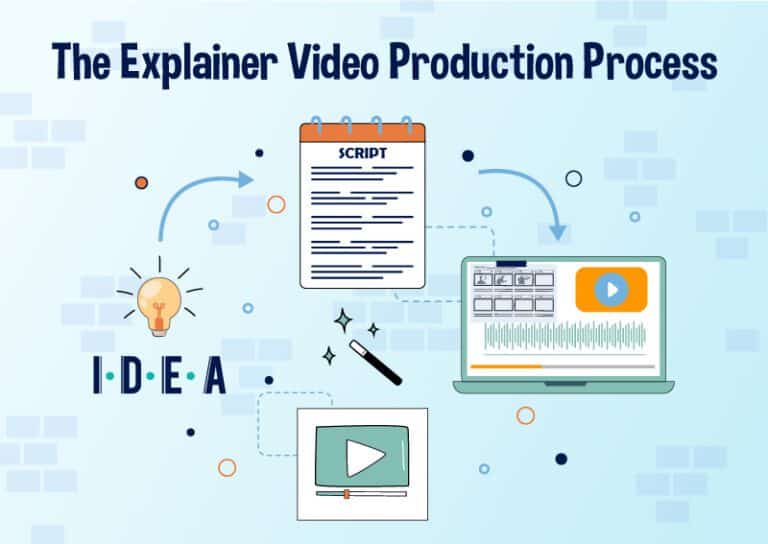
The Production Process
1. Discovery and messaging. Before any visuals, the actual message needs to be nailed down — what's the one thing you want a viewer to understand and do after watching? Skipping this step is the most common reason explainer videos end up unfocused.
2. Scriptwriting. A tight script, usually written to a specific target length, since pacing matters enormously in a short-format video — every second needs to earn its place.
3. Storyboarding. Visualizing the script scene by scene before committing to full production — this is the cheapest point to make major changes.
4. Voiceover recording. Professional narration recorded to match the finalized script and timing.
5. Animation or filming. Producing the actual visual content, in whichever style was chosen at the discovery stage.
6. Music, sound design, and final edit. Combining all elements into the finished piece, with pacing and sound design tuned to hold attention throughout.
What It Costs
Pricing depends heavily on style and length. As a general 2026 industry guide (confirm current rates directly — these vary by studio and complexity):
Style | Typical Range (30–90 second video) |
|---|---|
Simple motion graphics / whiteboard style | $1,500 – $4,000 |
Character-driven animation | $3,000 – $8,000 |
Live-action (basic) | $2,000 – $6,000 |
Live-action with animated overlays | $4,000 – $10,000 |
Premium/highly custom animation | $8,000 – $20,000+ |
Cost is driven primarily by animation style and complexity, video length, number of revision rounds included, and voiceover/localization requirements.
What Drives Cost and Timeline Up or Down
Revisions. Most studios include 1-2 rounds in an initial quote; extensive script or storyboard changes beyond that usually add cost — get this spelled out before work starts.
Custom character design vs. stock/template assets. Fully custom character animation costs meaningfully more than using established animation libraries or templates, but delivers a more distinctive, brand-specific result.
Voiceover and localization. Professional voiceover in multiple languages adds real cost per language, not just a flat translation fee.
Turnaround time. Rushed timelines typically carry a premium, same as any production work — plan ahead where you can.
How to Choose a Studio
Watch full videos in their portfolio, not just highlight reels. A 10-second cut of someone's best work tells you much less than watching a complete finished piece start to finish.
Ask who writes the script. Some studios only handle production and expect you to provide a finished script; others include scriptwriting and messaging strategy as part of the process — know which you're getting before you start.
Confirm the style fits your brand, not just what looks impressive in a portfolio — a highly stylized animation style that doesn't match your brand's tone can undercut the message even if the production quality is excellent.
Get a clear revision policy in writing. This is where explainer video projects most commonly run into friction — know exactly what's included before the first draft comes back.
Getting Started
The fastest way to get an accurate quote is to have a clear sense of your core message, target length, and preferred style (or a couple of reference videos you like) ready before your first conversation with a studio.
Ready to discuss your explainer video project? [Get a Quote →]
Book a discovery 20-minutes strategy call.
📞 +91-9910911696 | +91-9910660851
📩 info [@] chasingillusions [.] in
Written by Deepak, Content Strategist at Chasing Illusions Studio. Our clients include Ambler Surgical, Practo, Bayer, SMT, Novartis, and 100+ healthcare brands across India, USA, Thailand, and the UK.
Last Updated: June 29 2026 | Chasing Illusions Studio
TagsAnimation
Chasing Illusions Studio
Premium animation & video production studio based in Delhi, India. Specialising in 3D animation, medical visualisation, architectural walkthroughs, and CGI.