The case for industrial plant 3D visualization has moved well past the "impressive presentation" argument. Engineering and EPC teams now use walkthroughs as working tools — for design clash detection, pre-commissioning operator training, regulatory submissions, and emergency response planning — because they surface spatial information that two-dimensional drawings consistently fail to communicate.
The India 3D animation market reached $535 million in 2025 and is growing at 9% annually, driven substantially by industrial and infrastructure visualization demand. Internationally, the push from EPC contractors and plant owners toward visual-first project communication has made 3D walkthroughs a standard deliverable on major projects across oil and gas, chemicals, power generation, and heavy manufacturing.
This guide covers what an industrial plant 3D walkthrough actually involves — technically, commercially, and operationally — for plant owners, EPC contractors, HSE teams, and equipment manufacturers evaluating whether to commission one.
What an Industrial Plant 3D Walkthrough Is
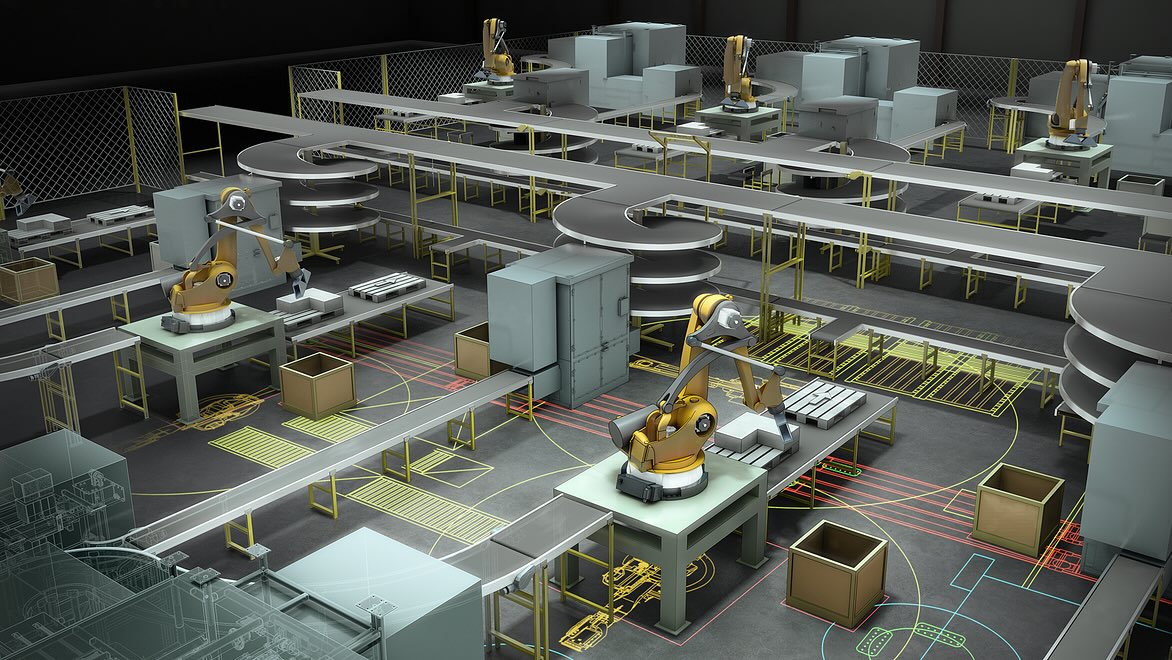
An industrial plant 3D walkthrough is a photorealistic animated visualization that guides the viewer through a facility as if physically navigating it — before the facility is built, retrofitted, or publicly presented. Unlike a static 3D render, which shows a single frozen moment from a single angle, a walkthrough is a continuous, directed journey through the space.
A full-plant walkthrough typically includes:
Exterior approach — aerial establishing shots, site perimeter, main access points
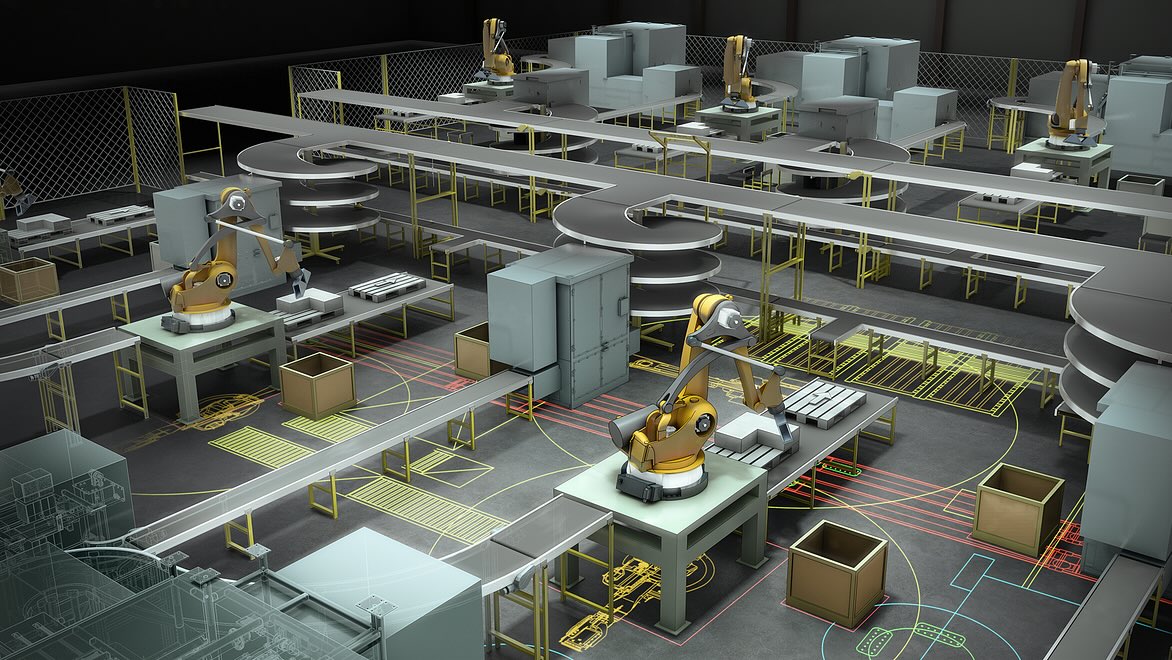
Process areas — reactors, distillation columns, conveyor systems, compressors, heat exchangers in operational context
Interior spaces — control rooms, maintenance corridors, pipe racks, utility areas
Movement — personnel in PPE, vehicles on access roads, materials in transit through the process
Safety systems — fire suppression zones, emergency exits, muster stations, color-coded pipe classifications
Environmental context — surrounding terrain, roads, boundary infrastructure
The final output is typically a high-definition video — 1080p or 4K — suitable for presentations, investor decks, regulatory submissions, safety training, and VR headset delivery. For architectural and real estate walkthroughs the creative logic is similar; for industrial projects, the technical accuracy requirements are significantly more demanding.
Who Commissions Industrial Plant 3D Walkthroughs
The use cases are wider than most people expect when they first encounter the format.
EPC and engineering contractors use walkthroughs to present design proposals competitively, communicate complex layouts to multidisciplinary teams, and align civil, structural, mechanical, electrical, and process disciplines on a single visual reference before detailed engineering is locked.
Plant owners and developers use them for investor and board presentations before CAPEX commitments are made, for regulatory and environmental approval submissions, and for community consultation where technical drawings would communicate nothing to a non-engineering audience.
Operations and maintenance teams use walkthroughs for pre-commissioning familiarization — ensuring that operators know the facility layout, equipment locations, and process flow logic before they step on site for the first time.
HSE departments use them to design and validate emergency response procedures, visualize evacuation routes, and produce training content without waiting for physical construction. For industries where our industrial safety animation work intersects with plant visualization, the walkthrough becomes the source asset from which multiple safety training modules are produced.
Equipment manufacturers and industrial suppliers use them to demonstrate how their products integrate into a plant environment — which is more persuasive in a competitive bid than a product data sheet alone.
Industries where industrial 3D plant visualization has become standard include oil and gas, chemicals and petrochemicals, mining and ore processing, power generation, steel and metals manufacturing, pharmaceutical production, food and beverage processing, and cement and building materials.
How an Industrial Plant 3D Walkthrough Is Produced
Understanding the production process is what enables you to evaluate quality, set realistic timelines, and brief a studio accurately.
Phase 1: Brief and Asset Collection (Weeks 1–2)
The brief establishes the purpose (investor presentation, regulatory submission, safety training, operator familiarization), the audience (engineering, executive, regulatory, public), the required level of detail, and the scope (full plant or specific zones).
Assets typically collected: engineering drawings including P&IDs and plot plans, elevation drawings, equipment data sheets, 3D CAD models where available, reference photographs of similar facilities, and brand and color guidelines. Projects where clients provide structured 3D CAD models reduce modelling time by a meaningful margin — the more complete the asset package, the faster and more accurate the output.
Phase 2: 3D Modelling and Scene Construction (Weeks 2–6)
This is the most time-intensive phase and where quality gaps between studios become most apparent. Industrial modelling requires technical literacy, not just artistic skill. The modelling team must understand the spatial logic of industrial environments — how pipe racks are laid out, how process equipment relates to maintenance access requirements, how utility areas connect to process areas.
The facility is built digitally: structures, equipment, piping, electrical infrastructure, access platforms, and landscaping. Textures and materials are applied — concrete, steel, painted surfaces, grating, insulation cladding, glass — each calibrated to behave correctly under different lighting conditions. For process-intensive facilities, materials flow is represented: ore through crushers, liquids through distillation columns, gases through compressors.
Phase 3: Camera Path and Storyboard (Weeks 4–5, Parallel)
The camera path — the sequence of movements through the facility — is a storytelling decision, not just a technical one. A well-designed path answers the question: what does this specific audience need to understand, and in what order?
A typical industrial walkthrough moves through aerial establishing shots, main access approach, process area overview, close-up sequences of critical equipment, utility areas, safety systems, and an aerial sign-off showing the full facility in operational state. Storyboards are shared for client approval before animation production begins, which is the most cost-effective point to make structural changes.
Phase 4: Lighting and Rendering (Weeks 6–9)
Industrial environments require careful lighting treatment. Plant environments have dramatic contrasts — bright exterior daylight against shadowed interior corridors, operational lighting from furnace openings or process equipment, and specific safety lighting zones. A professional studio uses physically based rendering (PBR) to simulate how light actually interacts with industrial materials. Steel and painted concrete reflect differently. A hot reactor has heat distortion. A wet processing area has different surface reflectivity than a dry one.
A 3–5 minute walkthrough at 24–30 frames per second requires between 4,320 and 9,000 individually rendered frames, each taking minutes to hours depending on scene complexity. Render farms — networks of high-performance GPU hardware — manage this at production scale.
Phase 5: Animation, Effects and Compositing (Weeks 8–10)
Beyond camera movement, a production-quality walkthrough includes machinery animation (conveyor belts, turbines, cranes, vehicles), process effects (steam, flare stacks, liquid flows, chemical reactions represented visually), human figures in appropriate PPE providing scale reference, and environmental detail (dynamic sky, wind effects, weather condition variations).
These elements transform a static 3D tour into a working, operational representation of the facility — which matters when the audience includes plant engineers who will immediately identify whether a facility looks like it operates or merely exists.
Phase 6: Audio, Titling and Delivery (Weeks 10–12)
Final production adds sound design calibrated to on-screen activity, optional music for investor-facing versions, on-screen labels and equipment callouts, and professional narration where required. Multilingual narration — for facilities with international stakeholder audiences or multinational workforces — is handled within the same production pipeline at Chasing Illusions.
Deliverables typically include a master 4K video file, compressed 1080p versions for presentations, chapter-marked long-form versions, and optional still renders from key moments for print or pitch deck use.
Industrial Plant 3D Walkthrough: Cost Reference (2026)
Pricing varies significantly by scope, level of engineering detail, and studio quality tier. The figures below reflect current market rates for professional-grade production.
Scope | Duration | Cost Range (INR) | Cost Range (USD) |
|---|---|---|---|
Single zone or equipment showcase | 1–2 min | ₹3L – ₹8L | $4,000 – $10,000 |
Process area walkthrough (partial plant) | 3–4 min | ₹8L – ₹20L | $10,000 – $25,000 |
Full plant walkthrough (exterior + interiors) | 5–8 min | ₹20L – ₹50L | $25,000 – $60,000 |
Full plant + interactive VR version | 6–10 min + VR | ₹40L – ₹80L | $50,000 – $100,000 |
Modular phased asset (updates per phase) | Retainer | Quoted per scope | Quoted per scope |
All figures exclude GST. USD rates apply to international clients billed in USD. Final pricing depends on engineering detail level, process FX complexity, revision rounds, and delivery format requirements.
What increases cost: High engineering detail (every instrument and fitting modelled), complex process effects, VR or real-time interactive versions, multilingual narration, tight timelines requiring parallel production teams, and revisions beyond agreed rounds.
What reduces cost: Client-supplied structured 3D CAD files (reduces modelling time significantly), clearly scoped brief with limited change rounds, standard rather than photorealistic quality tier for internal-use-only applications.
One consistent finding across projects: studios that quote unusually low prices typically recover the difference through scope creep, additional revision charges, and extended timelines. For technically demanding industrial projects where engineering accuracy determines credibility, the cost of a technically wrong animation — in terms of lost credibility with engineering audiences — typically exceeds any savings on production cost.
For context on how 3D visualization pricing compares across project types, our 3D rendering and visualization pricing guide covers the full range of services and budget considerations.
Where Industrial Plant Walkthroughs Deliver Measurable Value
Design Clash Detection Before Fabrication
The most expensive errors in industrial construction are discovered after fabrication or installation — a pipe that conflicts with a structural beam, a maintenance access point that becomes inaccessible once adjacent equipment is in place. Three-dimensional space is difficult to reason about from two-dimensional drawings, even for experienced engineers.
A 3D walkthrough forces a visual audit of the entire facility. Engineering teams reviewing an accurate 3D animation of their own design routinely identify spatial conflicts that were invisible across months of drawing review. A single significant rework item caught at the walkthrough stage — a pipe reroute or equipment repositioning before steel is cut — can recover multiples of the walkthrough's production cost.
Stakeholder Alignment Across Disciplines
Industrial projects involve civil, structural, mechanical, electrical, instrumentation, process, and safety engineering disciplines — plus procurement, construction management, operations, and executive leadership. Achieving genuine shared understanding across all of these using technical drawings requires an interpretive effort that not all stakeholders can make.
A walkthrough creates a single visual reference that everyone — regardless of technical background — can see, understand, and respond to. This alignment reduces miscommunication, accelerates approvals, and prevents decisions being made on different mental models of the same facility.
Regulatory and Environmental Submissions
Many industrial projects require regulatory submissions covering facility layout, safety provisions, and environmental impact. Visual walkthroughs make these submissions significantly more compelling — and faster to review — than 2D documentation. Reviewers can see containment measures, safety zone layouts, and facility relationships directly rather than interpreting technical drawings.
Operator Pre-Commissioning Training
Operators arriving at a new facility with existing 3D walkthrough familiarity — knowing the layout, equipment locations, and process flow logic before setting foot on site — consistently reach full operational competence faster than those arriving with document-only familiarization. For complex process plants where early-operation safety is critical, this familiarity has direct practical value.
Emergency Response Design and Safety Training
HSE teams use 3D walkthroughs to design evacuation routes, validate muster point placements, and simulate emergency scenarios before a facility is built. For hydrogen sulfide exposure procedures, confined space entry, or emergency shutdown sequences — visual animation improves procedural retention significantly compared to text-based training materials. Our industrial safety animation work specifically covers these applications.
What to Look For in an Industrial Visualization Studio
Not every animation studio has the technical depth for accurate industrial visualization. A studio that produces excellent residential architectural walkthroughs may produce output that is aesthetically convincing but technically wrong — incorrect equipment, implausible piping arrangements, wrong safety zone layouts — in ways that are immediately apparent to an engineering audience.
Technical literacy: Can the studio demonstrate understanding of industrial equipment, process plant layouts, and P&ID reading? Ask specifically how they translate engineering drawings into accurate 3D models.
Industrial portfolio: Have they produced walkthroughs for actual industrial clients in your specific sector? Can they provide relevant examples?
Engineering review stage: Do they build a structured technical accuracy review into the production workflow, or is accuracy checked only at the final output stage?
Data security: Industrial design information is commercially sensitive. Confirm NDA availability, data handling policies, and secure file transfer processes before sharing engineering documentation.
Timeline transparency: Ask for a detailed production schedule with named milestones and realistic client review buffers. Studios that quote unusually fast timelines typically absorb the time pressure at quality or through scope reduction.
Frequently Asked Questions
How long does an industrial plant 3D walkthrough take to produce?
For a full-plant walkthrough at moderate engineering detail, expect 8–12 weeks from brief sign-off to final delivery. Smaller single-zone scopes can be completed in 4–6 weeks. Rush timelines are possible but involve tradeoffs in team size, cost, or scope.
What files do we need to provide?
Ideally: 2D or 3D CAD files, P&IDs, plot plans, elevation drawings, equipment data sheets, and site reference photographs. Projects with complete CAD packages are faster and more accurate. We can work from 2D drawings alone, but the modelling phase will be longer.
Can the walkthrough be updated as the design evolves?
Yes. A well-structured 3D model is a reusable asset. We recommend discussing modular structure upfront if you know the design will change — it makes update production significantly more cost-efficient than rebuilding from a locked master file.
Can you produce interactive or VR-compatible versions?
Yes. Real-time interactive walkthroughs using game engine technology allow users to navigate freely rather than following a fixed camera path. VR versions compatible with Oculus Quest and similar headsets are also available. These require a higher production investment but deliver substantially more engagement for sales centre and investor presentation contexts.
What industries have you worked with?
Oil and gas, chemicals, power generation, steel and metals, pharmaceuticals, food processing, mining, and ore processing. Contact us with your specific sector and we will share directly relevant portfolio examples.
How do you ensure technical accuracy?
Our production process includes a dedicated engineering review stage where drawings are cross-checked against the 3D model before rendering begins. For complex industrial clients, we recommend two review stages: one at the modelling stage before rendering, and one at the animation stage before final output. This catches technical errors at the least costly point in production.
Can the same 3D model be used for both the walkthrough and safety training content?
Yes. For clients commissioning both a project walkthrough and safety training modules, a shared 3D asset base significantly reduces the cost of the training content. We can produce operator familiarization videos, emergency response training modules, and HSE induction content from the same model used for the project walkthrough.
Discuss your industrial visualization project with our team.
Chasing Illusions Studio is a Delhi-based animation and visualization company with experience across oil and gas, chemicals, power generation, steel manufacturing, and pharmaceutical production. We work with EPC contractors, plant owners, equipment manufacturers, and industrial consultants across India, the Middle East, Southeast Asia, and the UK.
Ready to visualize your facility? Start a conversation →
Book a discovery 20-minutes strategy call.
📞 +91-9910911696 | +91 9910660851
📩 info [@] chasingillusions [.] in
Written by Deepak, Content Strategist at Chasing Illusions Studio. Our clients include Tata Steel, Hindalco, Mase Atlantique, Epiroc, and 100+ industrial safety brands across India, USA, Thailand, and the UK.
Last Updated: June 23 2026 | Chasing Illusions Studio.
Chasing Illusions Studio
Premium animation & video production studio based in Delhi, India. Specialising in 3D animation, medical visualisation, architectural walkthroughs, and CGI.