To make a 3D anamorphic video, first define the target screen and viewing position, then build the 3D scene, calibrate the virtual camera to the screen geometry, create the perspective distortion, animate the subject, test the illusion in a screen mockup, and finally render the video in the display's required resolution and format.
Creating a 3D billboard illusion can look complicated at first. If you’re searching for how to make an anamorphic video, this guide explains the process from concept and camera setup to animation, rendering, and final delivery.
What Is an Anamorphic Video?
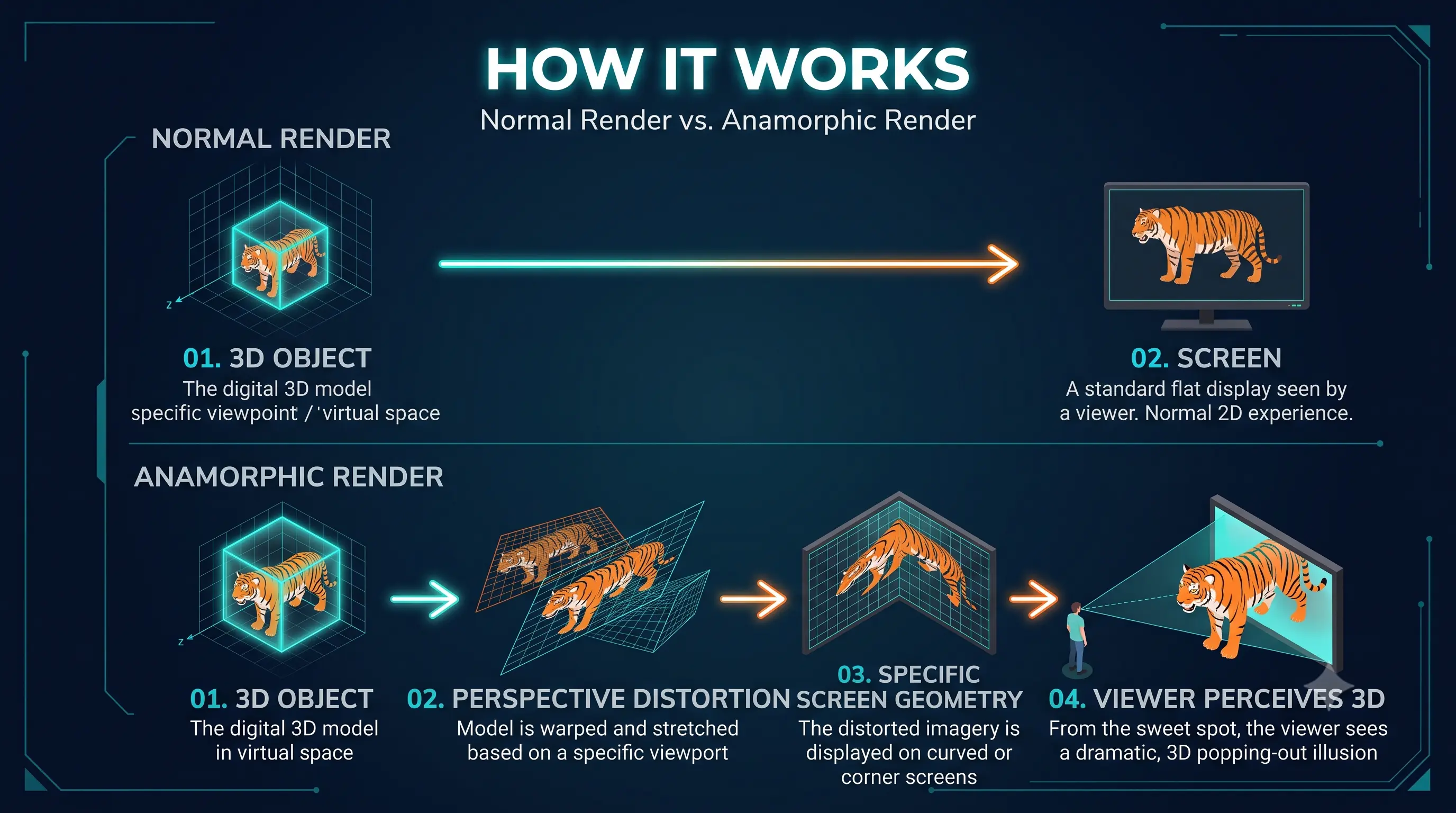
An anamorphic video is footage that's been optically squeezed or digitally stretched so it looks distorted when viewed normally. The idea is that when you view it from one specific angle, or through a special lens, the image resolves into correct proportions. It's often used for wide-screen cinema (2.39:1, oval bokeh, horizontal flares), where a squeezed frame fits onto standard film and gets unsqueezed during projection. Some artists also use it for perspective illusions on buildings or screens. So it's less a single format and more a technique for bending how the image is stored or displayed.
3D Anamorphic Video vs. Anamorphic Lens Footage
3D Anamorphic Video | Anamorphic Lens Footage | |
|---|---|---|
What it is | CGI content built to look three-dimensional and "pop off" a flat screen when viewed from one angle | Standard footage shot with special lenses (or faked in software) for a widescreen cinematic look |
Where it's seen | Curved LED billboards, mall installations, building corners, brand launch events | Films, YouTube, TikTok, commercials, music videos |
How it's made | 3D modeling and compositing software (Blender, Cinema 4D, Unreal Engine) | Anamorphic camera lenses, or post-production stretch/crop effects |
Primary goal | Create a jaw-dropping optical illusion for out-of-home advertising | Create a cinematic, "Hollywood" aesthetic for narrative or brand video |
Typical client | Brands running OOH/DOOH campaigns, product launches, exhibitions | Filmmakers, vloggers, marketers wanting a film-like look |
How Does a 3D Anamorphic Video Work?
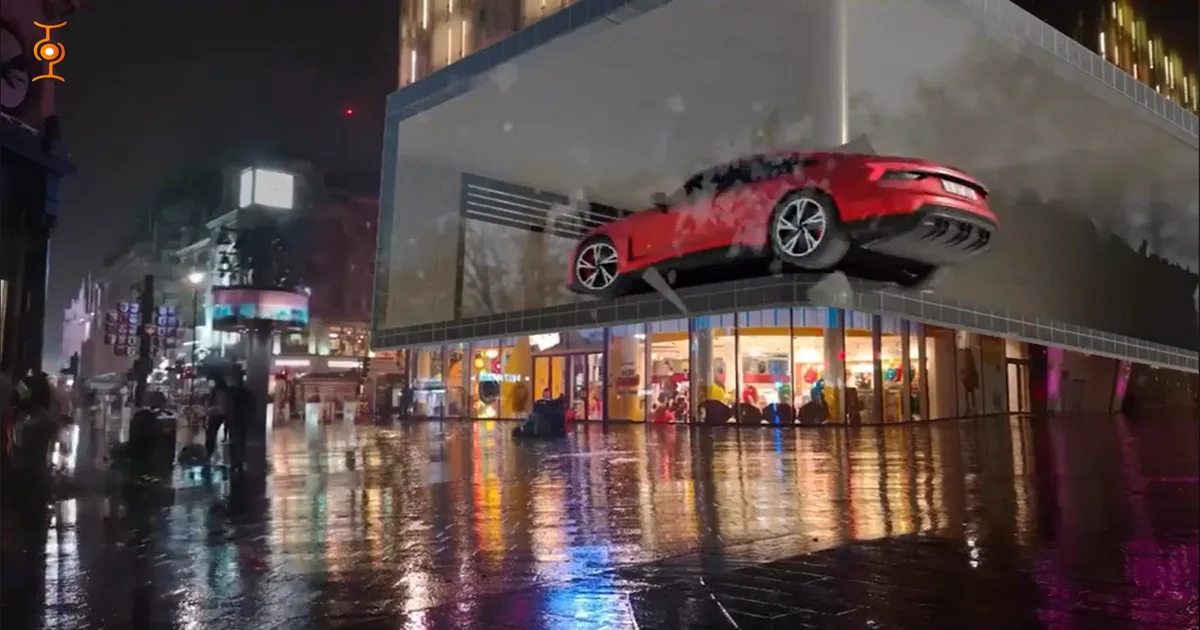
An anamorphic video works by mapping 3D content to a specific viewing geometry so that from the intended viewing area, the image appears correctly proportioned and three-dimensional. The technique relies on precise perspective calculations tied to the exact dimensions and positioning of the screen and the expected viewer location.
The three components that make the illusion work:
Perspective mapping — the 3D scene is built and rendered from a camera viewpoint that matches where real-world viewers will stand.
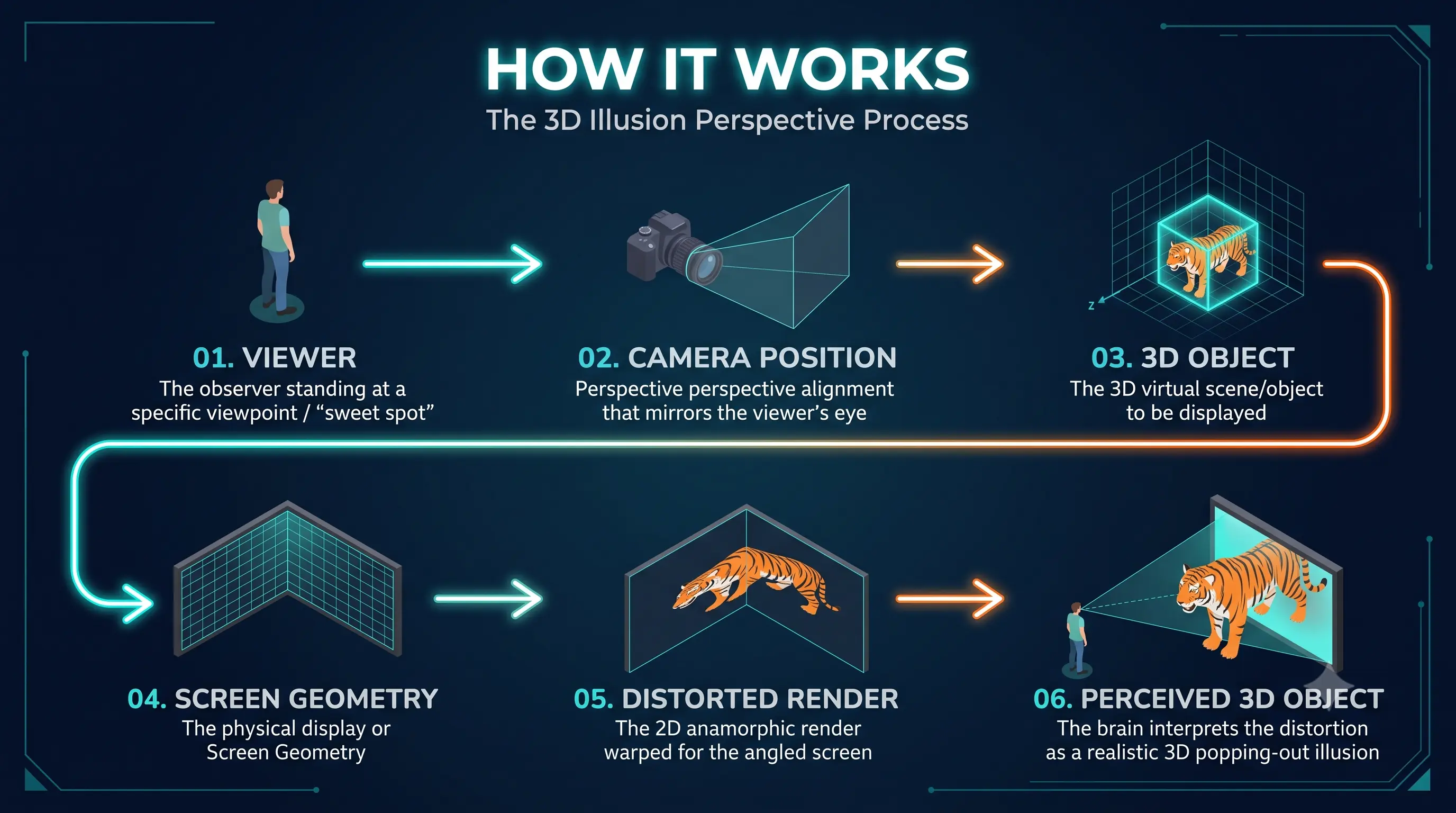
Screen geometry data — the exact dimensions and curvature of the physical display are fed into the 3D software so the render compensates for it.
Depth and motion cues — shadows, parallax, and animated elements (an object appearing to break the screen's edge) sell the 3D effect to the eye.
What Do You Need to Make an Anamorphic Video?
3D software
You'll need a program that lets you build geometry and control camera projection, like Blender, Cinema 4D, or Maya. These tools let you stretch and skew objects along a specific axis so the distortion matches your intended viewing position.
Target screen specifications
You need to know the exact resolution, aspect ratio, and physical dimensions of the screen or surface the video will play on. This determines how much you stretch the content and whether you're working with a flat panel, a projection wall, or an LED volume.
Viewing angle
Anamorphic illusions only work from one (or a narrow range of) viewing position(s). You have to define where the audience will stand or sit, including height and distance from the screen.
Camera/perspective setup
In your 3D scene, you place a virtual camera at the same relative position as the real viewer. The software then projects the scene onto the screen geometry from that camera's perspective.
Rendering hardware
Because you're often working with high resolutions and complex warping, a decent GPU helps a lot. Something like an NVIDIA RTX card with plenty of VRAM will speed up renders, though simpler scenes can work on modest hardware.
How to Make a 3D Anamorphic Video Step by Step?
Let's see how to create a 3D anamorphic video step-by-step. From defining the screen & concept to rendering & exporting video, here we cover each step one by one.
Step 1 — Define the Screen and Viewing Angle
Start by measuring the physical screen or surface you're targeting, including its exact resolution and dimensions. Decide where the viewer will stand or sit, since the whole illusion depends on that single vantage point.
Step 2 — Create the Concept
Sketch out what you want the illusion to be—often something that appears to pop out of or sink into the screen. Keep in mind that the effect reads best when the motion and depth are simple enough to register quickly.
Step 3 — Build the 3D Environment
Model your objects and scene in software like Blender, Maya, or Cinema 4D. You'll also want to build a rough version of the screen itself so you have something to project onto.
Step 4 — Set Up the Camera
Place a virtual camera that matches the real viewer's position, height, and distance. This camera becomes the reference point for all the distortion you'll apply later.
Step 5 — Create the Perspective Distortion
Stretch and warp the scene along the screen's axis so it only looks correct from that camera's view. This is the core trick—normally you'd fix distortion, but here you're deliberately baking it in.
Step 6 — Animate the Object
Add motion to your subject, keeping in mind how it will appear from the target angle. Fast or complex movement can sometimes weaken the illusion, so test as you go.
Step 7 — Add Lighting, Shadows and Reflections
Lighting sells the depth, especially shadows that seem to fall onto or off the screen surface. Reflections can help too, but don't overdo them or the effect can feel fake.
Step 8 — Test the Illusion
Render a preview and check it from the intended viewing position, ideally using a camera or your own eyes. Small tweaks to scale, position, or perspective are usually needed here.
Step 9 — Render the Final Video
Once you're done, render at the correct resolution (typically MP4 or MOV at 4K/8K, 24–60fps depending on the screen specification) and frame rate for the target screen. This can take a while depending on scene complexity and your hardware.
Step 10 — Test on the Actual Screen
Finally, play the video on the real screen and view it from the planned angle. Real-world lighting, screen curvature, and viewing distance can all shift the effect, so be ready to adjust.
For anamorphic-lens footage: shoot with an anamorphic lens or adapter (1.33x or 2x squeeze) at a wide aperture, then de-squeeze the footage in DaVinci Resolve or Premiere Pro to restore widescreen proportions before grading and export.
How to Make an Anamorphic Video in Blender?
Let's take a look at the steps below how to create an anamorphic video in Blender for beginners.
Set up your screen and camera reference
Create a plane or mesh that matches your real screen's dimensions and aspect ratio. Then place a camera at the height and distance where the real viewer will stand, since that becomes your anchor point.
Model your scene
Build your subject using standard modeling tools, keeping it relatively simple at first. You can always add detail later once the illusion works from the target angle.
Match the camera to the screen
Position and aim the camera so its view lines up with the screen plane. In Blender, you can use the camera's "Shift" and lens settings, or parent it to an empty, to fine-tune the framing.
Apply the distortion
Scale or skew your object along the axis pointing away from the viewer, often using simple object transforms or a lattice. The goal is to pre-warp the geometry so it looks correct only from that camera.
Animate the object
Use keyframes or the graph editor to add motion, checking the view from your reference camera as you go. Blender's viewport lets you switch between camera view and free view, which helps a lot here.
Add lighting and shadows
Use area or spot lights to cast shadows that seem to land on or lift off the screen surface. Soft shadows usually read better than harsh ones for this kind of illusion.
Test in Blender
Render a low-resolution preview and check it from the correct viewpoint, either in the viewport or as a quick render. Adjust scale, position, or perspective until it lines up.
Render the final output
Set your resolution and frame rate to match the target screen, then render. Cycles gives nicer lighting but Eevee is faster, so pick based on your hardware and deadline.
Check on the real screen
Play the finished video on the actual display and view it from the planned angle. Real lighting and screen curvature often require a few final tweaks.
How to Make Cinematic Anamorphic Footage With an Anamorphic Lens?
Understand what the lens does
An anamorphic lens squeezes the image horizontally when recording, then you stretch it back in post to get a wide frame. This is different from the 3D illusion technique—here it's about the optical look, like oval bokeh and horizontal flares.
Choose the right lens
Real anamorphic glass is expensive, so many people use adapters or budget options like Sirui or Great Joy lenses. Make sure the squeeze factor (usually 1.33x or 2x) matches your sensor and desired aspect ratio.
Match the sensor and aspect ratio
Full-frame and Super 35 sensors handle anamorphic differently, so check compatibility before buying. You'll typically desqueeze in post to get something like 2.39:1 or wider.
Set up the camera
Shoot at the highest resolution you can, since desqueezing crops or stretches the image. Keep the aperture moderate—wide open can make the edges too soft on cheaper glass.
Light for the look
Anamorphic lenses flare easily, so position lights to create those long horizontal streaks if that's the vibe you want. Avoid pointing bright sources directly into the lens unless you want heavy flare.
Compose with the squeeze in mind
Remember the image is squeezed in-camera, so framing looks odd on set. Use a monitor with desqueeze support so you can judge composition properly.
Focus carefully
Anamorphic lenses often have shallow depth of field and soft edges, so pull focus slowly and check critical shots. Budget adapters can be especially tricky here.
Desqueeze in post
Stretch the footage horizontally in your editor to restore correct proportions. Most NLEs have a simple setting for this, or you can do it manually with transform tools.
Grade for the cinematic feel
Anamorphic footage often benefits from a slightly cooler or teal-orange grade, but don't overdo it. The lens already gives you character, so subtle grading usually works best.
What Software Is Used to Create Anamorphic Videos?
For 3D anamorphic illusion video:
3D modeling/animation: tools like Blender, Cinema 4D, Maya
Real-time rendering: Unreal Engine
Compositing: After Effects, Nuke
For anamorphic-lens cinematic footage:
Camera: full-frame or Super 35 sensor camera
Lens: true anamorphic lens (1.33x or 2x squeeze) or anamorphic adapter
Editing/de-squeeze: DaVinci Resolve, Premiere Pro, Final Cut Pro
Effects: dedicated flare/bokeh plugins for realistic lens characteristics
Common Mistakes in Anamorphic Video
Skipping the screen-geometry audit. Guessing at screen curvature or dimensions instead of using accurate display data can compromise the illusion significantly.
Wrong viewing-geometry assumptions. If the intended viewer position isn't defined early, the 3D breakout effect may not read correctly in the real world.
No mockup test before final render. Skipping a virtual test against the actual screen geometry risks expensive rework.
Incorrect de-squeeze ratio (lens footage). Using the wrong stretch factor in post distorts faces and straight lines.
Overusing effects. Excessive lens flares or exaggerated depth cues distract rather than impress.
How Much Does an Anamorphic Video Cost?
Cost is driven mainly by screen complexity (flat panel vs. corner LED), animation length and detail, and whether on-location calibration is required. The figures below are illustrative Chasing Illusions production ranges — not industry-wide averages.
Production level | Flat screen | Corner wrap | Typical use |
|---|---|---|---|
Basic (~15 seconds) | Rs. 1,50,000 | Rs. 1,80,000 | Product marketing social reel |
Standard (~30 seconds) | Rs. 2,50,000 | Rs. 3,00,000 | Mid-scale brand campaign |
Premium (~30 seconds) | Rs. 4,50,000 | Rs. 5,50,000 | Large-scale event / LED wall |
Final pricing depends on screen specifications, concept complexity, modelling requirements, revisions, and delivery requirements.
Get a FREE anamorphic video quotation + cost sheet within 12 hours — contact us.
How Long Does Anamorphic Video Production Take?
Project level | Illustrative timeline |
|---|---|
Basic (15 sec, simple scene) | 10–12 working days |
Standard (30 sec, brand campaign) | 18–22 working days |
Premium (30 sec, high-detail / event scale) | 25–30 working days |
These are illustrative production timelines based on Chasing Illusions' standard workflow. Actual schedules depend on concept development, screen-data availability, modelling complexity, revision rounds, approvals, and final delivery specifications.
What Screen Types Does Anamorphic Video Need?
Display type | How it works | Typical use case |
|---|---|---|
Corner LED (2–3 panel) | Two or three LED screens joined at an angle; the physical corner provides additional geometry for forced-perspective compositions | Flagship billboards, retail storefronts, brand activations |
Single flat LED/digital billboard | One flat screen; can support perspective-based illusion content, though the available depth effect differs from a corner installation | DOOH campaigns, transit ads |
Projection mapping | Video projected onto a physical structure or building facade | Events, launches, temporary installations |
Static diorama + screen hybrid | Physical props combined with digital screen elements | High-end retail and entertainment marketing |
Corner LED formats are particularly well suited to dramatic "popping out of the screen" effects because the physical corner provides additional geometry for forced-perspective compositions. Flat-screen anamorphic work uses a single perspective calculation and delivers a different type of illusion.
Where Are Anamorphic Videos Used?
Anamorphic illusion videos are most commonly deployed in:
Out-of-home (OOH) advertising — curved LED billboards in high-traffic urban locations
Product launches and exhibitions — booth installations designed to draw crowds
Mall and retail installations — 3D screens embedded in shopping center walls or atriums
Brand social campaigns — filmed footage of the illusion re-shared on Instagram/TikTok for secondary reach (see social media videos)
Event projection mapping — temporary anamorphic installations at expos and product launches
Anamorphic lens footage (the cinematic variant) is used in feature films, streaming series, music videos, and high-production YouTube and branded content — often alongside digital commercials and brand promotion videos for a cinematic aesthetic.
What Are the Types of 3D Anamorphic Video Campaigns?
1. McDonald's Burger Ad
Chasing Illusions Studio handled this as a CGI piece, but it's a natural fit for anamorphic treatment since food reveals benefit from depth and pop-out effects.
2. Vivo Phone
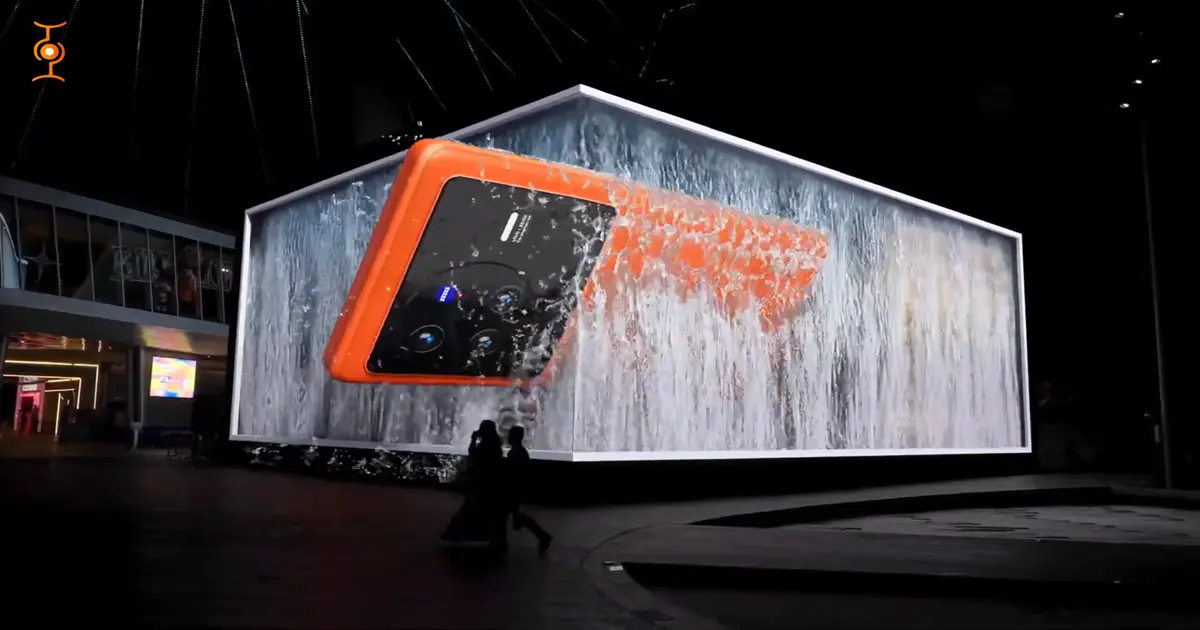
The studio produced this phone ad in CGI, and tech product launches are one of the strongest use cases for anamorphic illusions. A device rotating or emerging from the screen at an angle would showcase design details in a way flat video can't.
3. Kotak Credit Card
This financial brand campaign was handled by us, and cards suit anamorphic well because they're flat, recognizable objects. Having a card slide out of the screen or stack in 3D space could make a fairly static product feel dynamic.
4. Mitsubishi Electric Air Conditioner
We produced this CGI ad, and appliances work nicely for anamorphic when you want to show airflow or cooling effects. Visualizing cool air or the unit's profile extending off the screen would communicate the product's function clearly.
5. Etisalat Car Ad
This automotive piece was created by the studio, and cars are a classic anamorphic subject given their size and curves. A vehicle appearing to drive out of or angle off the screen tends to work well for billboard and event displays.
How to Choose an Anamorphic Video Production Company?
Evaluate any anamorphic video production company on four things: a portfolio with anamorphic-specific work (not just generic 3D), a documented production process, transparent pricing tied to deliverables, and in-house desqueeze and color grading capability.
Criteria | What to look for | Red flag |
|---|---|---|
Portfolio | Anamorphic/CGI-specific reel, named verifiable past projects | Only stock 3D renders, no anamorphic examples |
Process | Documented pipeline including mockup testing before final render | "We'll figure it out" answers |
Software stack | Production tools named specifically | Can't describe their toolchain |
Pricing | Itemized by deliverable (concept, render, grading, revisions) | Single flat quote with no breakdown |
Turnaround | Realistic estimate matching project scope | Unrealistically short timelines for complex work |
Revisions | Defined number of revision rounds in the contract | Unlimited revisions promised (scope-creep trap) |
Communication | Single point of contact, regular check-ins | Slow or unclear responses before contract |
In-House Team vs. Freelancer vs. Specialized Studio
Option | Best for | Cost profile | Risk |
|---|---|---|---|
In-house hire | High-volume, ongoing production | Higher fixed overhead | Slower to build specialist capability |
Freelancer | Smaller or one-off projects | Lower upfront cost | Availability and continuity risk |
Specialized studio | Brand campaigns, events, product launches | Higher project cost; full production pipeline | Higher upfront commitment |
Questions to Ask Before Signing
Can you show anamorphic-specific examples, not just general CGI work?
Do you simulate the exact screen and angle before final render, or only after?
Is desqueezing and grading done in-house or outsourced?
How many revision rounds are included in the quote?
What happens if the illusion doesn't read correctly on-site?
Who is my single point of contact during production?
FAQs:
Is an anamorphic video the same as a 3D video?
No. A 3D video typically requires special glasses or a stereoscopic display. An anamorphic illusion video creates the appearance of 3D depth using a flat 2D screen, relying entirely on forced perspective and viewing geometry — no special equipment needed.
Is an anamorphic video the same as a hologram?
No. A hologram uses light diffraction to create a genuinely three-dimensional image in space. Anamorphic illusion video is a 2D video that simulates three-dimensionality through perspective — there's no physical light manipulation involved.
Can anamorphic video be made without expensive equipment?
3D illusion video requires 3D modeling software (Blender is free) but demands modeling and animation skill. Anamorphic-lens cinematic footage can be simulated to some extent through cropping, stretching, and post-production effects, but this does not fully reproduce the optical characteristics of a real anamorphic lens.
Do anamorphic videos work on any screen?
Illusion-style content is built for a specific screen geometry and viewing area. Content designed for a curved corner screen will generally not translate to a flat billboard without adaptation.
Can 3D anamorphic content be reused across different screens or locations?
Generally not without adaptation — the perspective setup is built for a specific screen geometry and viewing position, so moving content to a different setup usually requires re-rendering.
What file format is the final video delivered in?
Typically MP4 or MOV at 4K or 8K resolution. Frame rate (24, 25, 30, or 60fps) is matched to the target display's specifications.
Which industries use anamorphic video most?
Entertainment and film, real estate and architecture, automotive and luxury goods, FMCG, and corporate events/expos are the most common use cases. Related formats include product animation and CGI & anamorphic videos for brand campaigns. For a broader overview of formats available, see types of 3D videos.
How do I make an anamorphic video in Blender?
Build your scene and place a camera that matches the real viewer's position, then pre-warp the geometry so it only looks right from that angle. Animate, light, and render at the target screen's resolution, testing from the correct viewpoint as you go.
What software is best for anamorphic video?
For 3D anamorphic illusions, Blender, Cinema 4D, and Maya are common choices, with Blender being free and capable. For optical anamorphic footage, you mainly need an editor like DaVinci Resolve or Premiere to de-squeeze, not specialized 3D software.
What resolution should an anamorphic billboard video be?
It depends on the physical screen, but large LED billboards often run 4K or higher, sometimes with custom aspect ratios.
What viewing angle is required for an anamorphic illusion?
There's no single universal angle—it's defined by where the camera or viewer sits relative to the screen. Typically it's a fairly direct, centered position, and moving even a little to the side can break the effect.
Can I create an anamorphic video without a curved LED screen?
Yes, most 3D anamorphic billboards actually use flat screens; the curve is an illusion created by the content itself. Curved screens can enhance certain effects, but they're not required for the technique to work.
How do I de-squeeze anamorphic footage?
Stretch the image horizontally in your editing software to restore correct proportions, using a simple scale or transform setting. The amount depends on your lens's squeeze factor, usually 1.33x or 2x.
Work With Chasing Illusions Studio
Chasing Illusions is a Delhi-based CGI and anamorphic video production studio with active client delivery across India, the US, and Thailand. Founded in 2009, the studio offers a full in-house pipeline — 3D modeling, rendering, desqueezing, and color grading handled internally, not outsourced.
Book a 20-minute discovery call
📞 +91-9910911696 | +91-9910660851 📩 info[@]chasingillusions[.]in
Chasing Illusions Studio
Premium animation & video production studio based in Delhi, India. Specialising in 3D animation, medical visualisation, architectural walkthroughs, and CGI.