If you've started looking into 3D work for a product, a building, or a marketing campaign, you've almost certainly seen "3D modeling," "3D rendering," and "3D visualization" used as if they mean the same thing. They're closely related — each depends on the one before it — but they describe different stages of work, produce different deliverables, and cost different amounts.
Getting the distinction right matters for practical reasons. It helps you brief a studio accurately, understand what a quote actually covers, avoid paying for a stage you don't need, and recognise when a supplier is quoting for something different from what you asked for. This guide breaks down all three in plain English, shows how they fit together, and helps you work out which one your project actually calls for.
The short answer
Before the detail, here's the quick version:
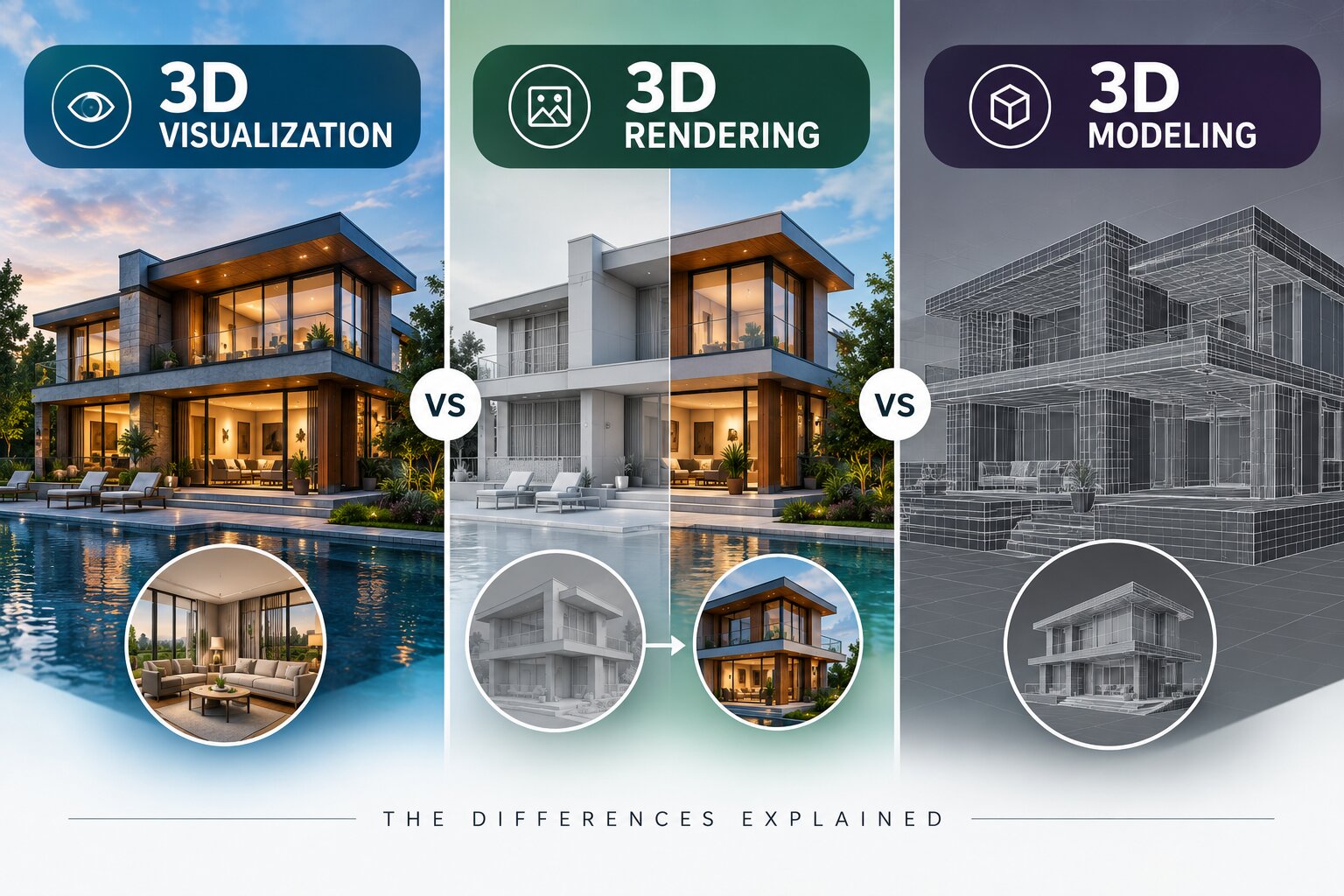
3D modeling is building the object — the digital sculpture. It has accurate shape but no realism.
3D rendering is taking a finished model and turning it into a realistic image, with materials, lighting, shadows, and a camera angle.
3D visualization is the whole outcome — using models and renders to communicate an idea, product, or space to an audience so they can understand or decide something.
A film analogy holds up well throughout this article: modeling is building the set, rendering is lighting and shooting the scene, and visualization is the finished footage the audience actually watches. You need all three to get to a result, but they're distinct crafts.
3D Modeling: building the object
3D modeling is the foundation everything else sits on. An artist uses software — commonly Blender, Autodesk Maya, or 3ds Max — to construct a digital object out of vertices (points), edges, and faces. The output is a raw model: geometrically accurate, correctly proportioned, but usually grey, matte, and obviously unfinished.
At this stage there are no realistic materials, no lighting, and no environment. A model of a wristwatch would show every curve, bezel, and component in the right place and at the right scale — but it wouldn't yet look like brushed steel or sapphire glass. It would look like a grey sculpture of a watch.
There are different modeling approaches depending on the goal. Hard-surface modeling suits manufactured objects like products, machinery, and vehicles, where precision and clean geometry matter. Organic modeling suits characters, creatures, and anything with flowing, irregular forms. For industrial and architectural work, models are often built to precise real-world dimensions so they can double as accurate references, not just visuals.
Modeling is where accuracy gets locked in, and it's the stage that most rewards care. If the model is wrong — wrong proportions, sloppy geometry, missing detail — every later stage inherits that mistake, and fixing it late is far more expensive than getting it right early. If you're curious how long this stage takes in practice, we cover it in how long it takes to create a 3D model.
You're paying for modeling when: you need an object built from scratch, you have a product or building with no existing 3D asset, or you need something engineered to precise real-world measurements.
3D Rendering: making it look real
Rendering is the step that turns a plain grey model into a believable image. The software simulates how light behaves in a scene — how it bounces off surfaces, reflects, refracts, casts shadows, and passes through materials like glass or liquid — and calculates a final picture from a chosen camera angle.
This is where the model finally gets its materials: brushed metal, frosted glass, woven fabric, matte plastic, polished wood. It's where lighting is designed — studio lighting for a product, natural daylight for a building, dramatic contrast for a hero shot. And it's where the composition and camera angle are set. A well-executed render can be genuinely hard to distinguish from a photograph, which is exactly why so many brands now use rendering in place of traditional product photography. We compare the two approaches directly in 3D product rendering vs traditional photography.
Rendering is computationally demanding. The software has to calculate the path and behaviour of light across the whole scene, and a single high-quality still image can take anywhere from minutes to hours to compute depending on complexity, resolution, and lighting. Animation multiplies that cost across every frame — a few seconds of finished animation is hundreds of individually rendered images. That processing time is a real and often underappreciated part of what rendering costs, and it's one of the main reasons animation is priced higher than stills.
One of rendering's biggest practical advantages is flexibility. Once a model exists, you can render it in different colours, materials, finishes, and settings without rebuilding anything or re-shooting a physical product. A furniture brand can show a sofa in twelve fabrics; a car maker can show every paint option; a developer can show an apartment furnished and unfurnished — all from one model. For a fuller breakdown of what drives the price, see how much 3D renderings cost.
You're paying for rendering when: you already have a model and need polished still images or video, or you need multiple looks of the same object without re-photographing anything.
3D Visualization: communicating the idea
Visualization is the umbrella term — it describes the finished result and, crucially, its purpose. It's what you actually put in front of a client, a buyer, an investor, or an audience. In most real projects, visualization combines modeling and rendering (and sometimes animation) into a deliverable that does a specific job.
The defining feature of visualization is intent. Modeling and rendering are technical stages; visualization is about the outcome — helping someone understand or decide something they couldn't grasp from a drawing, a spec sheet, or a description alone.
The forms it takes vary widely by industry:
In real estate and architecture, visualization means architectural walkthroughs and exterior renders that let buyers experience an unbuilt property. We go deeper in 3D visualisation for real estate.
In product and e-commerce, it means product animation and hero imagery that shows an item from every angle, in every variant.
In industrial and manufacturing settings, it means 3D visualization of plants and factories — showing a facility layout, process flow, or plant walkthrough before anything is built.
The common thread is communication. Whether the goal is to sell a flat off-plan, pitch a factory layout to stakeholders, or explain how a product works, visualization exists to make an idea legible to people who need to act on it.
You're commissioning visualization when: your goal is to communicate — to sell, pitch, train, or explain — rather than simply to produce a technical asset.
How the three fit together
In almost any project, the three stages happen in sequence, each building on the last:
Model the object or space — build the geometry and lock in accuracy.
Render it — add materials and lighting, set the camera, and produce the image or video.
Deliver it as a visualization — the finished asset that serves your actual goal.
You rarely buy just one stage in isolation. When a studio quotes you for "3D visualization," that price almost always includes modeling and rendering as stages within it. This is the single biggest reason the three terms get used interchangeably in everyday conversation — from the client's side, they arrive bundled as one deliverable, so the internal distinctions blur.
Where it's useful to keep them separate is in scoping and budgeting. If you already own an accurate model, you shouldn't be paying to build one again — you're buying rendering. If you need a product built from nothing, you're paying for modeling first, and rendering second. Knowing which stage you're actually commissioning is what lets you sanity-check a quote.
It's also worth noting where animation enters the picture, since it's often confused with the three terms above. Animation adds movement and time — a camera flying through a building, a product rotating, a machine operating. It sits on top of modeling and rendering rather than replacing them. We untangle that relationship in the difference between 3D rendering, 3D modeling, and 3D animation.
Which one do you actually need?
Here's the decision in the simplest possible terms:
"I have nothing yet and need a product or building built in 3D." -> You need modeling first, then rendering. Together, that's visualization.
"I already have a 3D model and just need great images or video." -> You need rendering.
"I need to show or sell something that doesn't physically exist yet." -> You need visualization, which will include both modeling and rendering as stages.
If you're still unsure, don't worry about arriving with the right vocabulary. The most useful thing you can bring to a studio isn't terminology — it's a clear description of the end result you want and where it will be used. "I need images of this product in six colours for my website" or "I need a two-minute flythrough of this building for investors" tells a good studio everything it needs to scope the right stages and price them. If you want to prepare well, how to brief a 3D animation studio walks through exactly what to include.
A quick reference table
Term | What it is | What you get | When you need it |
|---|---|---|---|
3D Modeling | Building the digital object | A raw, shape-accurate model | You need the asset built from scratch |
3D Rendering | Making the model photorealistic | Polished still images or video | You have a model and need finished visuals |
3D Visualization | The finished, purpose-driven result | A deliverable that communicates an idea | You need to show, sell, train, or explain |
(3D Animation) | Adding movement over time | Moving footage — flythroughs, rotations | You need motion, not just stills |
Common misconceptions worth clearing up
"Rendering and visualization are the same thing." Rendering is a technical step that produces an image; visualization is the purpose that image serves. You can render something with no communicative goal (a technical test), and a visualization can involve many renders assembled together. Related but not identical.
"A better render can fix a bad model." It can't. Rendering makes a model look real; it can't correct geometry that's wrong. Realistic lighting on an inaccurate model just produces a convincing image of the wrong thing. Accuracy is a modeling-stage decision.
"3D is always more expensive than photography." Not necessarily. Photography has real recurring costs — physical prototypes, studio hire, re-shoots for every variant or change. Once a 3D model exists, variants and updates are comparatively cheap, which is why many brands switch. We look at this trade-off in 3D product rendering and why UK businesses are switching.
"I need to specify the exact technique." You don't. Describe the outcome and the studio will select the right stages and tools. Over-specifying the method sometimes leads to ordering the wrong deliverable.
Bringing it together
Modeling, rendering, and visualization aren't competing options — they're three linked stages of a single pipeline. You model to build, you render to make it real, and the result is a visualization that does a job for your business. Animation adds movement when you need it.
Understanding the distinction won't just help you sound informed in a kickoff call. It helps you scope the work correctly, read a quote critically, ask sharper questions, and understand exactly where your budget goes at each stage — which is the difference between commissioning 3D work confidently and hoping you ordered the right thing.
If you'd like to talk through what your specific project needs, you can see the full range of what we do on our services page or get in touch for a scoped quote.
Getting Started
Ready to discuss your project? [Get a Quote →]
Book a 20-minute discovery strategy call.
📞 +91-9910911696 | +91-9910660851
📩 info [@] chasingillusions [.] in
Written by Deepak, Content Strategist at Chasing Illusions Studio. Our clients include Ambler Surgical, Practo, Bayer, SMT, Novartis, and 100+ healthcare brands across India, USA, Thailand, and the UK.
Chasing Illusions Studio
Premium animation & video production studio based in Delhi, India. Specialising in 3D animation, medical visualisation, architectural walkthroughs, and CGI.